⚡ Quick Verdict
Hostinger is the most impressive budget hosting provider in 2026 — and that sentence contains more nuance than it first appears. With LiteSpeed servers, NVMe SSD storage, a genuinely usable custom control panel, and pricing that starts under $3/month, it delivers performance that would have cost $30–$50/month just five years ago. For personal blogs, small business sites, and early-stage projects, Hostinger is a serious contender. But when your traffic scales, your WooCommerce store gets complex, or you need genuine server isolation and cloud-grade resources, the cracks start to show — and premium cloud hosts like Cloudways pull ahead convincingly.
✅ Best for: Beginners, bloggers, small business owners, and budget-conscious developers launching new projects.
❌ Not ideal for: High-traffic WordPress sites, agencies managing multiple client environments, or resource-heavy WooCommerce stores that need dedicated cloud infrastructure.
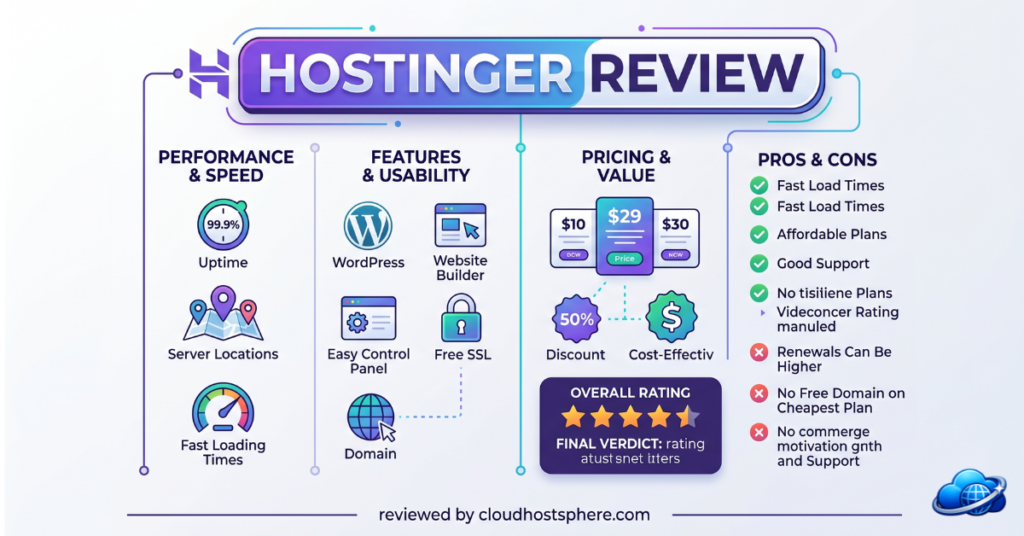
Overall Rating: 4.3 / 5
What Is Hostinger?
Founded in 2004 in Lithuania, Hostinger has grown into one of the world’s largest web hosting companies, serving over 29 million customers across 178 countries. It built its reputation by making reliable hosting genuinely affordable — not as a loss-leader but as a core business model. Today, Hostinger offers shared hosting, WordPress hosting, cloud hosting, VPS hosting, and even domain registration, all managed through its proprietary hPanel control panel.
Hostinger Plans & Pricing
Hostinger’s pricing structure is one of its biggest selling points — and one of its most misunderstood. The promotional prices you see advertised require a long-term commitment (typically 12–48 months). Renewal prices are higher, and it is worth reading the fine print before committing.
⚠️ Pricing shown below is based on publicly available Hostinger data as of May 2026. Always verify current rates at hostinger.com before purchasing.
Shared / WordPress Hosting Plans
| Plan | Websites | Storage | RAM | Monthly Price (Promotional) |
|---|---|---|---|---|
| Single | 1 | 50 GB NVMe | ~512 MB | ~$2.99/mo |
| Premium | 100 | 100 GB NVMe | ~1 GB | ~$3.99/mo |
| Business | 100 | 200 GB NVMe | ~2 GB | ~$5.99/mo |
| Cloud Startup | 300 | 200 GB NVMe | 3 GB | ~$9.99/mo |
VPS Hosting Plans
| Plan | vCPU | RAM | Storage | Monthly Price |
|---|---|---|---|---|
| KVM 1 | 1 Core | 4 GB | 50 GB NVMe | ~$4.99/mo |
| KVM 2 | 2 Cores | 8 GB | 100 GB NVMe | ~$8.99/mo |
| KVM 4 | 4 Cores | 16 GB | 200 GB NVMe | ~$15.99/mo |
| KVM 8 | 8 Cores | 32 GB | 400 GB NVMe | ~$29.99/mo |
Cloud Hosting Plans
| Plan | vCPU | RAM | Storage | Monthly Price |
|---|---|---|---|---|
| Cloud Startup | 2 Cores | 3 GB | 200 GB NVMe | ~$9.99/mo |
| Cloud Professional | 4 Cores | 6 GB | 250 GB NVMe | ~$14.99/mo |
| Cloud Enterprise | 6 Cores | 12 GB | 300 GB NVMe | ~$24.99/mo |
What is included across plans:
- Free domain name (on annual plans)
- Free SSL certificate (Let’s Encrypt auto-renewal)
- Free CDN (Hostinger CDN via Cloudflare integration)
- Free email hosting (unlike Cloudways — a genuine advantage)
- Weekly or daily backups (plan dependent)
- 1-click WordPress installer
- Free WordPress migration tool
- LiteSpeed web server with LSCache
- 30-day money-back guarantee
What is NOT included on lower-tier plans:
- Daily backups (only on Business plan and above — Single and Premium are weekly)
- Priority support queue
- Object caching (Redis) — available from Business plan up
- Unlimited databases (capped on Single plan)
View All Hostinger Plans & Current Deals →
Performance & Speed
This is where Hostinger has made the most dramatic improvements in recent years, and where it most directly challenges the “you need a premium cloud host” narrative.
LiteSpeed + NVMe: A Game-Changing Combination
Hostinger made a company-wide transition from Apache servers to LiteSpeed Web Server across its shared hosting infrastructure. Paired with NVMe SSD storage (which delivers read/write speeds roughly 6–7x faster than traditional SATA SSDs, per industry benchmarks), the result is shared hosting that performs far closer to entry-level VPS than the shared hosting of five years ago.
Key technology stack on Hostinger’s WordPress-optimised plans:
- LiteSpeed Web Server — significantly faster than Apache for WordPress due to native PHP handling
- LiteSpeed Cache (LSCache) — a free WordPress plugin purpose-built for LiteSpeed, handling full-page caching, image optimisation, CSS/JS minification, and lazy loading
- NVMe SSD Storage — faster I/O response times across all plan tiers
- PHP 8.x support — latest PHP versions for modern WordPress compatibility
- HTTP/2 and HTTP/3 — faster connection protocols enabled by default
- Cloudflare CDN integration — global content delivery reduces latency for international visitors
Uptime & Reliability
Hostinger maintains a 99.9% uptime guarantee (sourced from Hostinger’s official SLA). This is standard across the industry, but Hostinger’s track record in independent monitoring reports consistently shows actual uptime in the 99.93–99.97% range, which is strong for shared infrastructure.
Data Center Locations
Hostinger operates data centers across 9 locations globally:
- United States (2 locations)
- United Kingdom
- Netherlands
- Lithuania
- Singapore
- Indonesia
- Brazil
- India
You choose your preferred data center at account setup — always select the region closest to your primary audience for the best performance.
Honest Performance Assessment
Hostinger’s entry-level shared plans are genuinely fast for sites with moderate traffic (under 50,000 monthly visits). LiteSpeed Cache configured correctly can achieve Google PageSpeed scores of 90+ on optimised WordPress sites.
However, shared hosting is still shared hosting. When your server neighbours experience traffic spikes, your site can be affected. This is the fundamental architecture limitation no amount of LiteSpeed optimisation fully resolves. Hostinger’s Cloud Hosting and VPS plans eliminate this — they provide dedicated resources and genuine isolation from other users on the same infrastructure.
Bottom line on performance: For the price, Hostinger’s performance is remarkable. For high-traffic or mission-critical sites, step up to Cloud or VPS plans, or move to Cloudways/Kinsta.
Try Hostinger With a 30-Day Money-Back Guarantee →
Ease of Use & Dashboard
Hostinger does not use cPanel. Instead, it built its own control panel called hPanel — and unlike most “custom panels” that are worse than what they replaced, hPanel is genuinely excellent.
What hPanel Gets Right
The interface is clean, modern, and logically organised. From the moment you log in, the layout makes sense:
- Websites — your individual sites, each with their own management screen
- Hosting — server settings, PHP version, file manager, databases
- Domains — domain management, DNS editor, redirects
- Emails — email account creation, webmail, spam filters
- WordPress — dedicated WordPress section with auto-updates, staging, clone
The WordPress Management section is particularly well thought out. You can manage WordPress updates, plugins, themes, and create a staging environment without ever logging into wp-admin. For users managing multiple sites, this alone saves significant time.
File Manager
hPanel includes a built-in web-based file manager — a feature Cloudways notably lacks. For beginners who do not want to set up SFTP, this is a meaningful quality-of-life advantage.
1-Click Installer
Hostinger’s auto-installer supports 150+ web applications including WordPress, WooCommerce, Joomla, Drupal, PrestaShop, and OpenCart. Installation takes under 60 seconds.
WordPress AI Tools
Hostinger has integrated AI-powered website builder and WordPress setup tools that let you describe your site in plain language and get a pre-configured WordPress installation with relevant theme, plugins, and sample content. For beginners, this dramatically shortens the “blank screen” problem of starting a new site.
Migration Tools
The Hostinger Website Migrator plugin (free) handles WordPress migrations from other hosts with a guided wizard. For sites moving from cPanel-based hosts, it also supports cPanel backup file imports.
Ease of Use Verdict
hPanel is the best custom control panel in budget hosting — more intuitive than cPanel for new users, and fast enough for experienced developers. The only real complaint is that very advanced server-level configurations (custom Nginx rules, server-level redirects) require either support tickets or VPS/Cloud plans.
Ease of use rating: 4.7 / 5 — Genuinely one of the friendliest hosting dashboards available at any price point.
Customer Support Quality
Hostinger provides 24/7 live chat support as its primary channel. There is no phone support on standard plans, though email/ticket support is available for complex issues.
Support Access
| Channel | Availability | Notes |
|---|---|---|
| Live Chat | 24/7 | Available to all plan tiers |
| Email/Tickets | 24/7 | For complex or technical issues |
| Knowledge Base | 24/7 | Extensive library of tutorials |
| Phone Support | ❌ | Not available on any plan |
Hostinger’s AI Support Assistant
Like most major hosting providers in 2026, Hostinger has deployed an AI assistant as the first point of contact in live chat. For common questions (“How do I create a subdomain?” “How do I increase PHP memory?”) the AI assistant resolves issues quickly and accurately.
For genuinely complex issues — migration problems, server configuration errors, billing disputes — escalation to a human agent is available, though wait times can vary during peak hours.
Knowledge Base Quality
Hostinger’s knowledge base and tutorial library is one of the most comprehensive in the shared hosting industry. Step-by-step guides exist for virtually every common task, with screenshots updated regularly. For self-sufficient users, this means many issues can be resolved without ever opening a chat.
Honest Support Assessment
For everyday hosting questions, Hostinger’s support is fast and competent. Where it falls short compared to premium managed hosts is in proactive support — Hostinger support is reactive. If your WordPress site gets hacked or has a performance issue, they will help you fix it. But unlike Cloudways or WP Engine, they are not actively monitoring your application for issues. That level of managed support requires a premium plan.
Support rating: 4.1 / 5 — Excellent for the price tier; not a substitute for enterprise-grade managed support.
Security Features
Hostinger includes a solid baseline security layer across all plans, with more advanced features available on higher-tier plans.
Included Security Features
SSL & Encryption:
- Free Let’s Encrypt SSL certificates with automatic renewal on all plans
- Free Wildcard SSL certificates on Business plans and above
- HTTPS redirect management from hPanel
Malware & Threat Protection:
- Hostinger Malware Scanner — automated daily scans that detect and flag infected files (Business plan and above)
- DDoS Protection — network-level protection against distributed denial of service attacks on all plans
- ModSecurity WAF — Web Application Firewall active on all shared hosting plans, filtering common attack patterns (SQL injection, XSS, etc.)
Access Control:
- Two-Factor Authentication (2FA) for hPanel login
- IP access manager — restrict hPanel access to specific IP addresses
- SSH access available (VPS/Cloud plans; limited on shared)
Backups:
- Weekly backups on Single and Premium plans
- Daily backups on Business plan and above
- On-demand backups available as a paid add-on on lower plans
Honest Security Assessment
The ModSecurity WAF and DDoS protection provide a solid foundation for small to medium sites. The malware scanner being limited to Business plans and above is a genuine gap for Single and Premium plan users — a compromised site on those plans has no automated detection until damage is done.
For any site handling customer data or payments, the recommended setup is: Hostinger Business plan (or above) + Cloudflare free tier + Wordfence security plugin. This combination gives enterprise-level protection at a fraction of the cost.
Security rating: 4.2 / 5 — Strong baseline; important gaps on entry plans.
Who Should Use Hostinger?
✅ Hostinger Is a Great Fit If You Are…
A blogger or content creator launching a new site with limited budget. The Single or Premium plan delivers excellent performance for sites under 30,000–50,000 monthly visits, and the price is genuinely unmatched.
A small business owner who needs a professional website, email hosting, and a domain — all from one dashboard without technical expertise. hPanel makes management accessible even for non-technical users.
A developer testing new projects. At $2.99–$5.99/month, Hostinger is an ideal environment for spinning up WordPress installations for client demos, staging sites, or new project prototypes.
A student or freelancer building their first portfolio site. The combination of free domain, free SSL, free email, and simple setup removes all the friction from getting online fast.
A WooCommerce store in its early stages (under 500 products, under 1,000 monthly transactions). Hostinger’s Business plan handles small WooCommerce stores well with LiteSpeed + Redis object caching.
Someone switching from cPanel hosting to a better dashboard experience. hPanel is legitimately easier to navigate than most cPanel installs.
❌ Hostinger Is Not Ideal If You Are…
A high-traffic site owner (100,000+ monthly visits). Shared hosting infrastructure will create bottlenecks under sustained load. Move to Cloud Hosting, Hostinger VPS, or a dedicated cloud platform like Cloudways.
An agency managing 20+ client WordPress installations. Hostinger lacks the team access controls, Git deployment, and per-application staging environments that agency workflows require. Cloudways or WP Engine serve this use case far better.
An enterprise or SaaS business that needs guaranteed dedicated resources, SLA-backed uptime, and enterprise support. Hostinger’s shared infrastructure is not designed for this.
A site with complex server requirements — custom server configurations, multiple PHP versions simultaneously, complex Nginx rules. These require VPS-level access that shared plans do not provide.
Hostinger Pros & Cons
✅ Pros
- Outstanding value for money — more performance per dollar than any competitor at this price tier
- LiteSpeed + NVMe — genuinely fast shared hosting that approaches VPS performance for moderate traffic
- Free email hosting included — a critical advantage over Cloudways and DigitalOcean
- Free domain name on annual plans
- hPanel — the best custom control panel in budget hosting
- Built-in file manager — no SFTP client needed for basic file management
- AI-powered tools — website builder, WordPress setup, and content generation
- 29 million users — proven scale and infrastructure reliability
- 30-day money-back guarantee
- 9 global data center locations
- Free SSL on all plans with auto-renewal
- 150+ 1-click app installs
❌ Cons
- Promotional pricing requires long commitments — renewal prices are significantly higher
- No phone support on any plan tier
- Weekly backups only on entry plans — daily backups require Business plan
- Malware scanner limited to Business plan and above
- Shared hosting limitations — server neighbours can affect your performance during their traffic spikes
- No server-level custom configuration on shared plans — advanced setups require VPS
- Upselling during checkout — add-ons are aggressively presented during signup; read carefully before accepting
- No built-in Git deployment — developers need VPS for proper CI/CD workflows
- Resource limits on lower plans — CPU throttling can occur on sustained-load scenarios
Get Hostinger’s Best Current Deal →
Hostinger vs Alternatives
Hostinger vs Cloudways
Cloudways operates on an entirely different architecture — you are getting dedicated cloud server resources (DigitalOcean, AWS, GCP) rather than shared hosting infrastructure. A Cloudways DigitalOcean 2GB server at ~$22/month gives you fully dedicated RAM, CPU, and storage with zero noisy-neighbour risk. Hostinger’s Business plan at ~$5.99/month is remarkable value, but when traffic grows, Cloudways scales predictably and Hostinger shared hosting does not. Hostinger wins on price; Cloudways wins on performance ceiling, scalability, and agency/developer features.
Hostinger vs SiteGround
SiteGround is a respected mid-tier managed WordPress host with excellent customer support and a strong security track record. SiteGround’s entry plan starts around $2.99/month but renews at ~$14.99/month — a much steeper renewal jump than Hostinger. For pure value at renewal pricing, Hostinger wins clearly. For hands-on managed WordPress support and premium features, SiteGround is the better choice. Hostinger wins on long-term pricing; SiteGround wins on managed support quality.
Hostinger vs Bluehost
Bluehost has been a WordPress-recommended host for years and remains popular, particularly in the US market. Bluehost’s shared hosting performance has historically lagged behind Hostinger’s LiteSpeed infrastructure, and pricing is comparable. Bluehost scores points for its deep WordPress integration and WooCommerce focus, but head-to-head on raw performance benchmarks, Hostinger’s LiteSpeed + NVMe stack consistently comes out ahead in independent tests. Hostinger wins on performance and value; Bluehost wins on brand recognition and WordPress ecosystem integration.
Final Verdict
The question this review set out to answer was: Can budget hosting compete with premium clouds?
The honest answer in 2026 is: Yes — up to a point. And Hostinger is the budget host that comes closest to closing that gap.
For most new and growing websites, Hostinger’s Business plan at $5.99/month is genuinely outstanding. You get LiteSpeed performance, NVMe storage, free email, free domain, free SSL, daily backups, and Redis caching — a combination that would have required a $30–$50/month plan from a competitor not long ago. For bloggers, small businesses, freelancers, and early-stage projects, Hostinger is arguably the best choice on the market at its price point.
Where Hostinger falls short is above a certain traffic and complexity threshold. High-traffic sites, agencies managing multiple client environments, WooCommerce stores at scale, and applications requiring guaranteed dedicated resources will hit the ceiling of shared hosting infrastructure regardless of how good that infrastructure is. At that point, Cloudways, Kinsta, or WP Engine become the logical step up.
Use Hostinger to start fast and start affordably. Use the money you save to invest in your content and marketing. When you outgrow it — and if your site succeeds, you will — the upgrade path is clear.
CloudHostSphere Rating: 4.3 / 5
| Category | Score |
|---|---|
| Performance & Speed | ⭐⭐⭐⭐½ 4.4/5 |
| Ease of Use | ⭐⭐⭐⭐⭐ 4.7/5 |
| Value for Money | ⭐⭐⭐⭐⭐ 5.0/5 |
| Customer Support | ⭐⭐⭐⭐ 4.1/5 |
| Security | ⭐⭐⭐⭐ 4.2/5 |
| Features | ⭐⭐⭐⭐ 4.0/5 |
🚀 Ready to Get Started With Hostinger?
Hostinger’s plans start from under $3/month and include a free domain, free SSL, free email hosting, and a 30-day money-back guarantee. No risk to try.
Already running a bigger site? Compare Hostinger vs Cloudways to find the right fit for your traffic level.
If you sign up through our link, we may earn a commission at no extra cost to you. Read our full affiliate disclosure.
Last updated: May 27, 2026. Pricing and features may change — always verify current details at hostinger.com.
📝 Editorial Note: This review is research-based, drawing on Hostinger’s official documentation, published performance specifications, verified user reviews on Trustpilot and G2, and independent third-party benchmark data available as of May 2026. CloudHostSphere maintains full editorial independence — our ratings are not influenced by affiliate relationships.