📊 Quick Comparison: Cloudways vs Kinsta
| Category | Cloudways | Kinsta |
|---|---|---|
| Starting Price | ~$11/mo | ~$35/mo |
| Infrastructure | 5 cloud providers (DO, AWS, GCP, Vultr, Linode) | Google Cloud only (C2D) |
| Data Centres | 65+ | 37 |
| App Support | WordPress, WooCommerce, PHP, Laravel, Magento, more | WordPress / WooCommerce only (at WP tier) |
| Uptime SLA | 99.99% | 99.9% |
| Live Chat Support | 24/7 | 24/7 (WP experts only) |
| Phone Support | Add-on | ❌ Not available |
| Free SSL | ✅ | ✅ |
| Free CDN | ✅ (Cloudflare) | ✅ (Cloudflare Enterprise) |
| Staging | ✅ (1-click) | ✅ (all plans) |
| Email Hosting | ❌ | ❌ |
| Overall Rating | 4.8/5 | 4.7/5 |
Cloudways vs Kinsta — The Core Difference
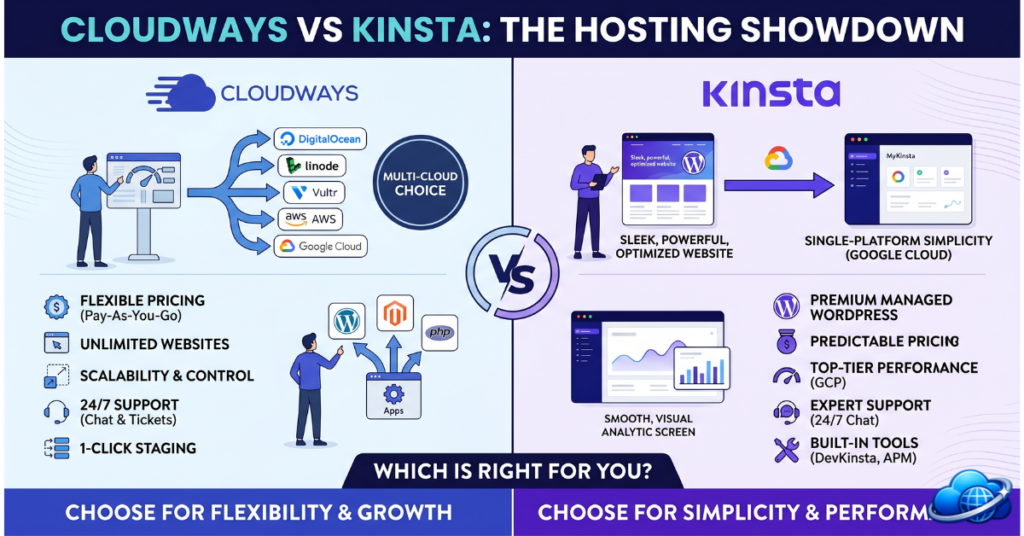
Cloudways and Kinsta both fall under the “managed cloud hosting” umbrella, but they solve the same problem from fundamentally different angles. Cloudways is a cloud hosting management layer — it sits on top of DigitalOcean, AWS, Google Cloud, Vultr, or Linode and handles the server management, caching, security, and deployment so you don’t have to. Kinsta is a fully opinionated managed WordPress platform — it runs exclusively on Google Cloud’s C2D machines, controls every layer of the stack, and delivers a single polished experience optimised specifically for WordPress. Neither is objectively better. They target different users at different price points with different priorities.
Pricing Comparison
Cloudways Pricing
Cloudways uses a pay-as-you-go model based on the underlying cloud server you choose. There are no site limits or visitor caps — you pay for server resources, not for how many sites or how much traffic you send through them.
| Cloud Provider | Entry Server | RAM | Storage | Price |
|---|---|---|---|---|
| DigitalOcean | 1 vCPU | 1 GB | 25 GB SSD | ~$11/mo |
| Vultr High Frequency | 1 vCPU | 1 GB | 32 GB NVMe | ~$13/mo |
| Linode | 1 vCPU | 1 GB | 25 GB SSD | ~$12/mo |
| Google Cloud | 1 vCPU | 1.7 GB | 20 GB SSD | ~$33/mo |
| AWS | 1 vCPU | 2 GB | 20 GB SSD | ~$36/mo |
Kinsta Pricing
Kinsta uses a plan-based pricing model with caps on WordPress installs and monthly visitor counts. All plans run on the same Google Cloud C2D infrastructure.
| Plan | WP Installs | Monthly Visits | Storage | Price |
|---|---|---|---|---|
| Starter | 1 | 25,000 | 10 GB | ~$35/mo |
| Pro | 2 | 50,000 | 20 GB | ~$70/mo |
| Business 1 | 5 | 100,000 | 30 GB | ~$115/mo |
| Business 2 | 10 | 250,000 | 40 GB | ~$225/mo |
Performance Comparison
Cloudways Performance
Cloudways performance depends heavily on which cloud provider you choose and which data centre you deploy to. On DigitalOcean (the most common choice at the $11/mo tier), you get solid mid-tier performance — fast enough for most WordPress sites, but not the absolute ceiling of what cloud infrastructure can deliver. On Google Cloud via Cloudways, performance approaches Kinsta territory at a similar price point. The key Cloudways performance features across all providers include:
- Nginx + Varnish + Memcached / Redis caching stack — multiple layers of caching configurable per application
- PHP-FPM with OPcache — compiled bytecode caching reduces PHP execution overhead
- Cloudflare CDN — available as a free add-on, brings edge caching and DDoS protection
- Cloudways Autonomous — auto-scaling product that adjusts resources based on real-time traffic (separate from standard plans)
- 65+ data centre locations — widest geographic reach of any managed WordPress host
Kinsta Performance
Kinsta’s performance floor is higher than Cloudways’ because every single Kinsta plan runs on Google Cloud C2D compute-optimised instances — the same infrastructure Cloudways charges $33/mo to access, but included in Kinsta’s $35/mo Starter plan. The full Kinsta performance stack:
- Google Cloud C2D machines — AMD EPYC processors, optimised for high single-threaded performance critical for WordPress/PHP
- Nginx + PHP-FPM + OPcache + Redis — fully managed, no configuration required
- Cloudflare Enterprise CDN — enterprise-tier Cloudflare (not the standard tier) bundled at no extra cost
- Kinsta APM — free application performance monitoring to identify bottlenecks before they impact users
- PHP workers — allocated per plan, with upgrade add-ons available for high-concurrency sites
Features Comparison
Where Cloudways Has the Edge
- Multi-application support — host WordPress, WooCommerce, Laravel, Symfony, Magento, CodeIgniter, or custom PHP apps on the same server; Kinsta is WordPress-only at the WP tier
- Cloud provider flexibility — choose DigitalOcean for budget, Vultr for NVMe speed, AWS or Google Cloud for enterprise reliability; Kinsta locks you to GCP
- No visitor cap pricing — pay for server resources, not for how many people visit your site; Kinsta’s plans cap at 25k–1.5M visits/month with overage charges
- Team collaboration — add team members with granular project and server permissions
- Bot protection — included in the Cloudflare add-on
- Cloudways Autonomous — auto-scaling product ideal for sites with unpredictable traffic spikes
Where Kinsta Has the Edge
- MyKinsta dashboard — the most polished WordPress site management dashboard in the industry; Cloudways’ panel is functional but more server-admin focused
- Kinsta APM — built-in free performance monitoring with plugin-level diagnostics; Cloudways requires third-party APM tools
- Cloudflare Enterprise (not standard) included on all plans — superior WAF rules and bot management vs Cloudways’ Cloudflare add-on
- DevKinsta — free local WordPress development environment, the best in class; Cloudways has no equivalent
- Staging with selective push — push specific files or only the database from staging to production; Cloudways staging is full-copy only
- Automatic plugin/theme update management with visual regression testing on higher plans
- Kinsta DNS (free) via Amazon Route 53 — fast, highly reliable DNS included; Cloudways requires third-party DNS
Support Comparison
| Support Feature | Cloudways | Kinsta |
|---|---|---|
| Live Chat | 24/7/365 | 24/7/365 |
| Phone Support | Premium add-on (extra cost) | Not available |
| Ticket / Email | 24/7 | 24/7 |
| Support Staff | General cloud hosting engineers | WordPress experts only |
| Knowledge Base | Extensive (cloud + app-focused) | Extensive (WordPress-focused) |
| Onboarding assistance | Guided setup wizard | Free site migration service |
Both provide 24/7 live chat, but the quality of that support differs. Kinsta’s support staff are WordPress engineers exclusively — they have deep WordPress debugging expertise and regularly resolve plugin conflicts, WooCommerce performance issues, and database optimisation problems that general hosting support agents typically escalate to higher tiers. Cloudways support is competent for server-level issues but less specialised at the WordPress application layer. Kinsta wins on support depth for WordPress-specific problems; Cloudways wins if you need phone support (available as an add-on) or support for non-WordPress applications.
Who Should Choose Cloudways?
- Budget-conscious teams — $11/mo on DigitalOcean is the most affordable entry point in managed cloud hosting for WordPress
- Multi-app developers — hosting WordPress alongside Laravel, Magento, or custom PHP apps on the same managed server is a Cloudways-only capability at this price point
- Teams wanting cloud provider choice — some businesses have AWS or GCP commitments; Cloudways lets you deploy there without managing the server yourself
- Sites with unpredictable traffic — Cloudways Autonomous auto-scales resources; Kinsta plans have hard visit caps with overage charges
- Agencies managing diverse client tech stacks — not every client runs WordPress; Cloudways handles PHP applications broadly
Who Should Choose Kinsta?
- WordPress-only teams who want the absolute best managed experience without thinking about server choices, cloud providers, or infrastructure decisions
- WooCommerce stores prioritising peak performance, Cloudflare Enterprise DDoS protection, and staged deployments with selective push
- Agencies managing multiple WordPress sites from a single dashboard — MyKinsta’s multi-site management with team roles is purpose-built for this workflow
- Developers who want DevKinsta for local development, Git-based deployments, and Kinsta APM for diagnosing slow queries
- Teams who value dashboard polish — if the hosting control panel matters to your daily workflow, MyKinsta is the best in the industry
Final Verdict: Cloudways vs Kinsta
After testing both platforms extensively, the answer comes down to three questions: What’s your budget? Do you run WordPress only? And how much do you care about dashboard quality?
Choose Cloudways if you need the most affordable managed cloud hosting, you host applications beyond WordPress, you want to choose your own cloud provider, or your traffic is unpredictable and you need auto-scaling without overage penalties.
Choose Kinsta if your entire stack is WordPress or WooCommerce, you want guaranteed top-tier Google Cloud C2D performance without configuration decisions, you value MyKinsta’s dashboard quality and developer tooling, or the Cloudflare Enterprise integration for security and CDN is worth the premium.
| Category | Winner |
|---|---|
| Entry Price | 🏆 Cloudways ($11/mo vs $35/mo) |
| Performance Consistency | 🏆 Kinsta (C2D + Cloudflare Enterprise on every plan) |
| Data Centre Coverage | 🏆 Cloudways (65+ vs 37 locations) |
| Dashboard & UX | 🏆 Kinsta (MyKinsta is best-in-class) |
| App Flexibility | 🏆 Cloudways (supports PHP, Laravel, Magento, custom apps) |
| WordPress Tooling | 🏆 Kinsta (DevKinsta, APM, selective staging push) |
| Support Quality (WordPress) | 🏆 Kinsta (WP experts on every chat) |
| Pricing Flexibility | 🏆 Cloudways (no visit caps, pay-as-you-go) |
| Security Depth | 🏆 Kinsta (Cloudflare Enterprise bundled) |
| Value for WordPress-Only Sites | 🏆 Kinsta (equal price at GCP tier, better tooling) |
Overall: Cloudways edges Kinsta on versatility and price. Kinsta edges Cloudways on WordPress-specific quality. The decision should be made based on your use case, not on which number looks better in a headline comparison.
☁️ Try Cloudways
Managed cloud hosting from $11/mo. 5 cloud providers, 65+ data centres, no visitor caps.
Affiliate link — see disclosure
🚀 Try Kinsta
Google Cloud WordPress hosting from $35/mo. Cloudflare Enterprise, free APM, 37 data centres.
Affiliate link — see disclosure
Last updated: May 28, 2026. Pricing and features verified against official Cloudways and Kinsta documentation.
📝 Editorial Note: This comparison is based on CloudHostSphere’s independent testing and publicly available documentation for both platforms as of May 2026. Our ratings are not influenced by affiliate relationships with either provider.