⚡ Quick Verdict
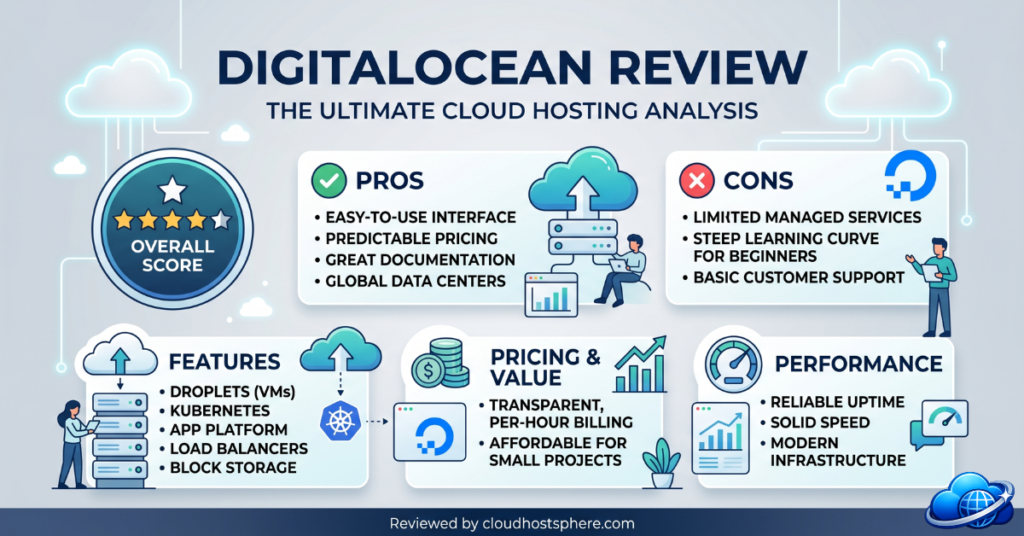
DigitalOcean is the gold standard for developer-friendly cloud infrastructure in 2026. Its Droplet VPS instances, clean API, transparent pricing, and industry-leading documentation make it the first choice for developers who want raw cloud infrastructure at honest prices. It is not managed WordPress hosting — you are responsible for server configuration, security hardening, and software management. But for developers who know what they’re doing, or for teams using DigitalOcean via a management layer like Cloudways, it delivers exceptional performance and reliability at a price no managed host can match.
✅ Best for: Developers, DevOps teams, startups, and technically capable teams who want clean cloud infrastructure at transparent pricing without the overhead of managed hosting.
❌ Not ideal for: WordPress beginners who need managed hosting, teams without server management experience, or businesses needing phone support and managed security.
Overall Rating: 4.6 / 5
What Is DigitalOcean?
Founded in 2011 in New York City, DigitalOcean set out to build the cloud infrastructure platform that AWS and Google Cloud were too complex and expensive for most developers to use effectively. Its formula worked: by 2026, DigitalOcean powers over 600,000 businesses across 190 countries. The company went public on the NYSE in 2021 and continues to expand its product portfolio from simple cloud VPS (Droplets) into a full developer cloud platform including managed Kubernetes, managed databases, serverless functions, and a managed application platform (App Platform) that handles deployment without server configuration.
DigitalOcean Products & Pricing
Droplets (Cloud VPS)
Droplets are DigitalOcean’s core product — Linux-based cloud virtual machines available in multiple configurations billed hourly or monthly.
| Droplet Type | vCPU | RAM | Storage | Transfer | Price |
|---|---|---|---|---|---|
| Basic (Shared) — Entry | 1 | 1 GB | 25 GB SSD | 1 TB | ~$6/mo |
| Basic (Shared) — Mid | 2 | 2 GB | 60 GB SSD | 3 TB | ~$18/mo |
| General Purpose | 2 | 8 GB | 25 GB SSD | 4 TB | ~$63/mo |
| CPU-Optimised | 2 | 4 GB | 25 GB SSD | 4 TB | ~$42/mo |
| Memory-Optimised | 2 | 16 GB | 50 GB SSD | 4 TB | ~$84/mo |
| Storage-Optimised | 2 | 16 GB | 300 GB SSD | 4 TB | ~$130/mo |
Managed Products
- Managed Kubernetes — container orchestration without cluster management overhead; from $12/mo (worker nodes billed separately)
- Managed Databases — PostgreSQL, MySQL, Redis, MongoDB managed clusters; from $15/mo
- App Platform — fully managed application deployment (build, deploy, scale); from free tier to $12/mo per app
- Spaces Object Storage — S3-compatible object storage; from $21/mo (250 GB)
- DigitalOcean Functions — serverless compute; pay per invocation
Performance & Infrastructure
DigitalOcean runs its own data centres across 15 regions including New York, San Francisco, London, Frankfurt, Amsterdam, Singapore, Bangalore, Sydney, and Toronto. All Droplets run on KVM virtualisation with SSD storage and a 40 Gbps internal network. DigitalOcean’s 99.99% uptime SLA on Droplets is backed by credits for any downtime beyond this threshold.
Premium NVMe Droplets
DigitalOcean’s Premium Intel and Premium AMD Droplet tiers use NVMe SSD storage instead of standard SSDs, delivering significantly faster I/O for database-heavy applications and high-read WordPress sites. Premium Droplets cost approximately 20% more than standard equivalents but offer measurably better storage performance for I/O-intensive workloads.
DigitalOcean for WordPress
Running WordPress on DigitalOcean directly requires either using a one-click WordPress Droplet from the Marketplace (sets up a basic LAMP stack) or configuring Nginx, PHP-FPM, a database, and caching manually. Neither approach is managed. The recommended path for WordPress teams that want DigitalOcean’s infrastructure without server management is Cloudways — which manages a DigitalOcean Droplet on your behalf, handling security, caching, backups, and WordPress deployment automatically from $11/month.
Developer Experience
DigitalOcean’s developer experience is the best in the cloud VPS market. The control panel (called the DigitalOcean Cloud) is consistently cited as easier to navigate than AWS, Google Cloud, or Azure by developers evaluating cloud providers for the first time. Its API is clean, comprehensive, and well-documented — supporting infrastructure-as-code workflows via Terraform, Pulumi, and Ansible.
DigitalOcean Standout Features
- Marketplace — 200+ one-click app stacks including WordPress, LAMP, LEMP, Docker, Node.js, MongoDB, and Kubernetes configurations
- Floating IPs — static IPs that can be instantly reassigned between Droplets for zero-downtime failover
- Volumes — detachable block storage volumes that can be moved between Droplets (10 GB–16 TB)
- Load Balancers — managed load balancing with health checks and SSL termination from $12/mo
- VPC Networks — private networking between Droplets at no extra cost
- DigitalOcean Monitoring — built-in metrics, alerts, and uptime checks included free
- $200 free credit for new accounts (60-day trial)
Support
DigitalOcean’s support model reflects its infrastructure-focused positioning: community-first, documentation-heavy, with paid premium support tiers for businesses needing direct engineer access. The free tier provides ticket-based support with reasonable response times. Premium support plans ($50–$500/month) provide faster response SLAs and dedicated account management. The DigitalOcean Community — with over 4,000 tutorials and active Q&A forums — is arguably the best self-service support resource in the cloud VPS market.
DigitalOcean Pros & Cons
✅ Pros
- Transparent, hourly/monthly pricing — no hidden fees or surprise bills
- The cleanest cloud control panel in the industry — significantly easier than AWS or GCP console
- Excellent API — fully scriptable, excellent Terraform and Ansible support
- 15 global data centre locations with consistent latency performance
- Premium NVMe Droplets for I/O-intensive workloads
- $200 free credit for new accounts — generous trial period
- Best cloud developer documentation and community tutorials
- Competitive pricing at every tier — consistently cheaper than AWS and GCP equivalents
❌ Cons
- Unmanaged — you are responsible for server security, patching, and software configuration
- No managed WordPress hosting product — WordPress sites need either manual setup or a tool like Cloudways
- Free support tier is ticket-only with no guaranteed response time
- No phone support on any plan
- Smaller global footprint than AWS, Google Cloud, or Azure for truly global applications
Final Verdict
DigitalOcean in 2026 is the best cloud VPS platform for developers who want clean infrastructure at fair prices with an excellent developer experience. It is not the right choice if you need managed WordPress hosting, phone support, or server management handled for you. But for technically capable teams building on Linux, it remains the most approachable entry point into real cloud infrastructure. For WordPress teams that want DigitalOcean’s infrastructure with full server management, Cloudways on DigitalOcean is the recommended path.
| Category | Score |
|---|---|
| Performance & Speed | ⭐⭐⭐⭐½ 4.6/5 |
| Ease of Use | ⭐⭐⭐⭐½ 4.5/5 |
| Value for Money | ⭐⭐⭐⭐⭐ 4.9/5 |
| Developer Experience | ⭐⭐⭐⭐⭐ 4.9/5 |
| Support | ⭐⭐⭐⭐ 4.0/5 |
| Managed Features | ⭐⭐⭐ 3.0/5 |
☁️ Ready to Try DigitalOcean?
DigitalOcean offers cloud VPS from $6/month — with $200 free credit for new accounts, 15 global data centre locations, transparent pricing, and the best developer documentation in cloud hosting.
Start With DigitalOcean — $200 Free Credit →Last updated: May 30, 2026. Pricing and features verified against official DigitalOcean documentation.