Running a WooCommerce store is a different beast from running a regular blog. When your site is your business, slow load times mean lost sales, downtime means lost revenue, and a security slip can mean lost customer trust. So choosing the right host isn’t just a technical decision — it directly affects how much money your store makes. This guide walks you through exactly what WooCommerce needs from a host, and how to pick one that won’t let you down when it matters most.
🛒 The Quick Take
WooCommerce is more demanding than a normal WordPress site — it can’t be fully cached, it runs constant database queries, and it handles sensitive payment data. You want a host with strong, consistent performance, rock-solid uptime, proper security (ideally PCI-friendly), and support that picks up fast when something breaks during a sale. Cheap shared hosting can work when you’re starting out, but as orders grow, so should your host.
Why WooCommerce Is Harder to Host Than a Blog
It helps to understand why stores need more horsepower. A normal blog post can be cached — served as a static snapshot to thousands of people without breaking a sweat. But a WooCommerce store has dynamic, personal pages that can’t be cached the same way:
- Carts, checkout, and account pages are unique to each visitor, so they bypass caching and hit your server directly every time
- Constant database activity — every product view, cart update, and order writes to the database
- Traffic spikes during sales, launches, and holidays can overwhelm underpowered hosting exactly when you can least afford it
- Payment data means you need proper security and, ideally, PCI-compliance support
This is why a store on cheap, overcrowded shared hosting often feels sluggish at checkout — the one place you absolutely cannot afford friction.
What to Look For in WooCommerce Hosting
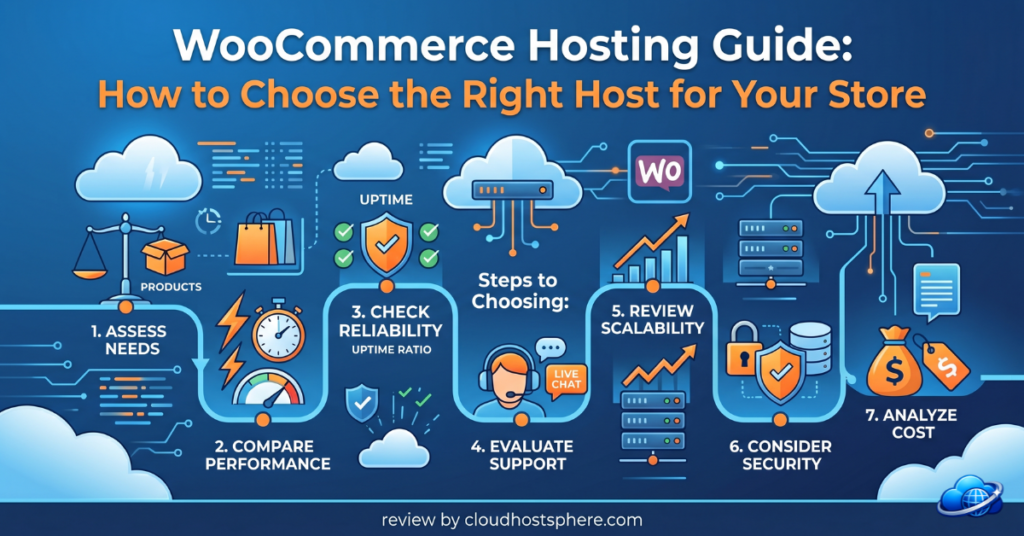
1. Consistent, Dedicated Performance
Because store pages can’t all be cached, raw server speed matters more than for a blog. Look for NVMe storage, LiteSpeed or Nginx, plenty of PHP workers (these handle simultaneous dynamic requests — vital at checkout), and ideally dedicated resources so a busy neighbour can’t slow your store down.
2. Reliable Uptime
Every minute your store is down is money gone. Look for a genuine uptime guarantee — 99.9% at minimum, and ideally higher. Premium hosts like LiquidWeb even back a 100% uptime SLA with real financial compensation, which is reassuring when your livelihood is on the line.
3. Security & PCI Compliance
You’re handling customer payment details, so security isn’t optional. Look for free SSL (required for any store), a web application firewall, malware scanning, daily backups, and — for serious stores — PCI-compliance assistance.
4. Fast, Knowledgeable Support
When checkout breaks during your biggest sale of the year, you need help now — not a ticket queue. Prioritise hosts with genuinely fast, capable 24/7 support. This is one area worth paying a little more for.
5. Room to Scale
Your store will (hopefully!) grow. Choose a host that lets you scale up resources easily, so a good month doesn’t crash your site.
Our WooCommerce Hosting Picks by Stage
💡 The right choice depends on where your store is right now. Here’s how we’d match a host to your stage.
🌱 Just Starting Out (low order volume)
If you’re launching and watching costs, a fast LiteSpeed budget host will serve you well to begin with. ChemiCloud and HostArmada both offer LiteSpeed + NVMe speed, free SSL, daily backups, and free migrations — plenty for a store finding its feet, at a price that won’t strain a new business.
📈 Growing Store (steady, rising orders)
Once orders are consistent, move to managed cloud for dedicated resources and better spike handling. Cloudways is the popular sweet spot here — flat pricing, no visitor limits, choose-your-cloud flexibility, and dedicated resources that keep checkout snappy as you grow.
🏆 Serious Revenue (your store is the business)
When downtime genuinely costs you money, it’s worth investing in premium managed hosting built for commerce. LiquidWeb is our top pick here — a 100% uptime SLA with compensation, 59-second support response, PCI-compliance assistance, and infrastructure built for high-traffic stores. It’s not cheap, but for a store doing real revenue, the reliability pays for itself the first time you don’t go down during a rush.
🛒 Our Top WooCommerce Pick
For stores where uptime and speed directly affect revenue, LiquidWeb is built for exactly this — guaranteed uptime, PCI-compliance help, and 59-second expert support.
Explore LiquidWeb for WooCommerce →Affiliate link — we may earn a commission at no extra cost to you. Disclosure.
A Few WooCommerce Hosting Tips
- Use a CDN — speeds up images and static assets for shoppers worldwide
- Keep PHP up to date — newer PHP versions are meaningfully faster for WooCommerce
- Enable object caching (Redis) — dramatically reduces database load on dynamic pages
- Don’t over-rely on plugins — every extra plugin adds weight; keep it lean
- Test your checkout under load before your big sale, not during it
The Bottom Line
Your host is the foundation your store stands on. Start with something fast and affordable while you’re finding your feet, then upgrade to managed cloud or premium commerce hosting as your orders grow. The goal is simple: a store that loads fast, stays online, keeps customer data safe, and has knowledgeable support ready when you need it. Get that right, and your hosting quietly does its job — letting you focus on actually selling.
Not sure where to start? Read our complete guide to choosing WordPress hosting, or see our top managed hosting picks for 2026.
Last updated: June 2, 2026.