“Cloud hosting” and “shared hosting” are two of the most commonly confused terms in web hosting — and choosing the wrong one can cost you in performance, money, or both. If you are launching a WordPress site, a business website, or an online store in 2026, understanding the real difference between these two hosting types is the single most important decision you will make before signing up. This guide breaks down exactly how each works, what they cost, who they’re for, and how to pick the right one.
⚡ The Short Answer
Shared hosting is the cheapest way to get online — many websites share one physical server’s resources. Best for new blogs, small sites, and tight budgets.
Cloud hosting distributes your site across multiple connected servers, offering better performance, reliability, and the ability to scale. Best for growing sites, businesses, and stores that can’t afford downtime.
What Is Shared Hosting?
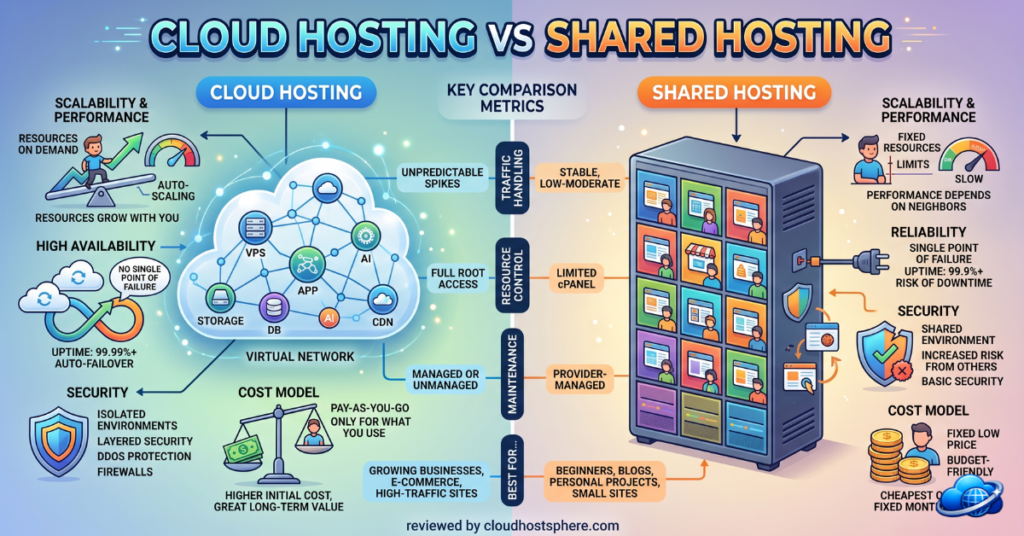
Shared hosting is the entry point of the web hosting world. With shared hosting, your website lives on a single physical server alongside dozens — sometimes hundreds — of other websites. All of these sites share the same pool of resources: CPU, RAM, storage, and bandwidth. Think of it like renting a room in a shared apartment: it’s affordable, it covers your basic needs, but you’re sharing the kitchen, bathroom, and utilities with everyone else in the building.
How Shared Hosting Works
- One physical server hosts many websites simultaneously
- Server resources (CPU, RAM, bandwidth) are divided among all accounts
- The hosting provider manages all server maintenance, security patches, and updates
- You manage your website through a control panel like cPanel or hPanel
- Pricing is low because infrastructure costs are spread across many customers
Pros of Shared Hosting
- Cheapest option — typically $2–$10/month
- Beginner-friendly — fully managed, no technical knowledge required
- Quick setup — one-click WordPress installation, instant activation
- No maintenance — the host handles all server-level management
Cons of Shared Hosting
- The “noisy neighbour” problem — if another site on your server gets a traffic spike or runs heavy scripts, your site can slow down
- Limited resources — strict caps on CPU and memory usage; exceeding them throttles your site
- Lower reliability — if the server goes down, every site on it goes down
- Harder to scale — when you outgrow it, you must migrate to a different hosting type
What Is Cloud Hosting?
Cloud hosting takes a fundamentally different approach. Instead of relying on a single physical server, your website runs on a network of interconnected virtual servers — “the cloud.” Your site’s resources are pulled from this cluster of machines, and if one server fails, another instantly takes over. Using the apartment analogy: cloud hosting is like having access to an entire building’s resources on demand, with the ability to instantly expand into more rooms when you need them, and a guarantee that if one floor loses power, you’re seamlessly moved to another.
How Cloud Hosting Works
- Your website runs across multiple connected servers (a cluster)
- Resources are pulled dynamically from the cluster as needed
- If one server fails, your site automatically shifts to a healthy server — no downtime
- You can scale resources up or down on demand, often instantly
- Pricing is usually based on the resources you use or a fixed plan tier
Pros of Cloud Hosting
- Better performance — dedicated, isolated resources mean faster, more consistent speeds
- Higher reliability — built-in redundancy; if one server fails, another takes over instantly
- Scalable — handle traffic spikes by adding resources on demand without migrating
- No noisy neighbour problem — your resources are isolated from other accounts
- Better uptime — most cloud hosts offer 99.99% uptime guarantees
Cons of Cloud Hosting
- More expensive — typically $11–$50+/month for managed cloud hosting
- Can be more technical — unmanaged cloud (like raw DigitalOcean) requires server knowledge
- Variable pricing — usage-based models can produce unpredictable bills if not managed
Cloud Hosting vs Shared Hosting: Head-to-Head
| Feature | Shared Hosting | Cloud Hosting |
|---|---|---|
| Price | $2–$10/mo | $11–$50+/mo |
| Performance | Basic, variable | Fast, consistent |
| Reliability | Single point of failure | Redundant, auto-failover |
| Uptime | ~99.9% | ~99.99% |
| Scalability | Limited — must migrate | Scale on demand |
| Resource isolation | Shared with neighbours | Isolated resources |
| Traffic spike handling | Poor — throttling/downtime | Excellent — auto-scale |
| Best for | New/small sites | Growing sites, stores, business |
| Technical skill needed | None | None (managed) to some (unmanaged) |
Which Should You Choose?
Choose Shared Hosting If…
- You’re launching your first website or blog
- Your budget is tight (under $10/month)
- You expect low-to-moderate traffic (under 10,000 visits/month)
- You want the simplest possible setup with zero technical involvement
- Your site is a hobby project, portfolio, or small informational site
Good budget shared/cloud-shared options include ChemiCloud, HostArmada, and Hostinger — all of which use LiteSpeed servers that deliver better-than-average shared hosting performance.
Choose Cloud Hosting If…
- Your site is growing and traffic is increasing
- You run an online store or business site where downtime costs money
- You experience or expect traffic spikes (marketing campaigns, seasonal sales)
- Performance and reliability matter more than saving a few dollars
- You want room to scale without migrating later
For managed cloud hosting, Cloudways is the most popular entry point at $11/month, while Kinsta and LiquidWeb serve the premium end of the market.
The Middle Ground: Cloud-Based Shared Hosting
In 2026, the line between shared and cloud hosting has blurred. Several providers now offer “cloud-based shared hosting” — shared hosting that runs on cloud infrastructure rather than a single physical server. This gives you much of the reliability and performance of cloud hosting at shared hosting prices. HostArmada is a strong example, running all its shared plans on genuine cloud infrastructure starting at $2.49/month. This hybrid model is often the best value for sites that have outgrown basic shared hosting but aren’t ready for the cost of full managed cloud.
Final Verdict
If you’re just starting out and watching your budget, shared hosting (ideally a modern LiteSpeed or cloud-based shared plan) is the smart, affordable choice. As your site grows — more traffic, more revenue, higher stakes — cloud hosting becomes worth the extra cost for its performance, reliability, and scalability. The good news: migrating from shared to cloud hosting is straightforward, and most quality hosts offer free migration. Start where you are, and upgrade when your traffic and revenue justify it.
🚀 Ready to Get Started?
For budget-friendly cloud-based shared hosting, HostArmada starts at $2.49/mo. For managed cloud hosting that scales, Cloudways starts at $11/mo.
Try HostArmada →
Try Cloudways →
Affiliate links — we may earn a commission at no extra cost to you. Disclosure.
Last updated: June 1, 2026.