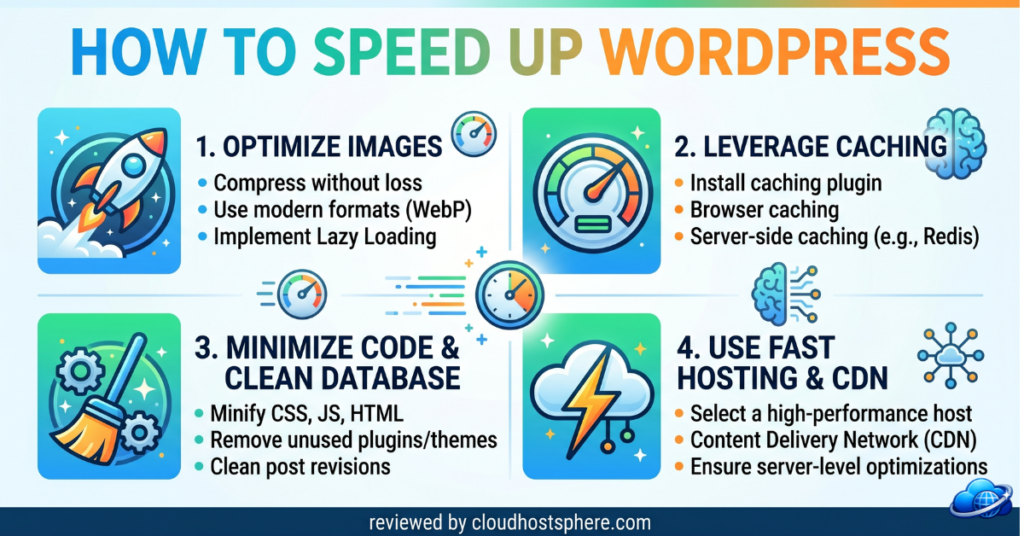
A slow WordPress site costs you visitors, rankings, and sales. Google has made page speed a ranking factor, and studies consistently show that even a one-second delay in load time can drop conversions by 7%. The good news? Most WordPress speed problems are fixable — often without spending a penny. This guide walks you through the most effective speed improvements, in order of impact, so you can get the biggest results first.
⚡ Quick Speed Wins (Start Here)
- ✅ Install a caching plugin (free — biggest single improvement)
- ✅ Use a CDN (free with most hosts)
- ✅ Compress and lazy-load images
- ✅ Keep PHP updated (8.x is significantly faster)
- ✅ Choose a fast host with LiteSpeed + NVMe (the foundation everything else builds on)
1. Start With Your Hosting (The Foundation)
No amount of caching and optimisation can fully overcome slow hosting. Your server is the foundation — if it’s sluggish, everything built on top of it will be too. Before tweaking plugins, check whether your host is actually fast. The key things to look for:
- LiteSpeed web server — handles WordPress requests significantly more efficiently than Apache
- NVMe SSD storage — much faster disk reads than standard SSD or HDD
- PHP 8.x — modern PHP versions are dramatically faster for WordPress
- Server location close to your audience — physical distance adds latency
If your host doesn’t offer these, switching is often the single biggest speed improvement you can make. Budget hosts like ChemiCloud and HostArmada run LiteSpeed + NVMe and are genuinely fast for the price. If you need scalable cloud performance, Cloudways and ScalaHosting’s managed VPS are strong options.
2. Install a Caching Plugin
Caching is the single most impactful free change you can make. Instead of WordPress building each page from scratch every time someone visits, a cache plugin saves a static snapshot and serves it instantly. The speed difference can be dramatic — pages that took 2–3 seconds can load in under 0.5 seconds after caching.
- LiteSpeed Cache (free) — best option if your host uses LiteSpeed; incredibly powerful with built-in CDN, image optimisation and database cleanup
- WP Rocket (paid, ~$59/year) — the most beginner-friendly option with excellent results across any host
- W3 Total Cache / WP Super Cache (free) — solid free alternatives if you’re on Apache
3. Use a CDN (Content Delivery Network)
A CDN stores copies of your static files (images, CSS, JavaScript) on servers around the world, delivering them from the location closest to each visitor. This dramatically reduces load times for international visitors and takes load off your server. Most good hosts include a free CDN:
- Cloudflare (free tier) — the most popular CDN, works with any host, easy to set up
- Built-in CDN — ChemiCloud, HostArmada, ScalaHosting and others include free Cloudflare or their own CDN
- WPX Cloud CDN — custom-built for WordPress, included free with WPX Hosting
4. Optimise Your Images
Images are typically the largest files on any web page — and the most common cause of slow load times. Three things to do:
- Use modern formats — convert images to WebP (much smaller than JPG/PNG, same quality). Plugins like ShortPixel or Imagify do this automatically
- Compress images before uploading — aim for under 200KB for most images
- Lazy load images — only load images as visitors scroll to them (WordPress does this by default now, but double-check your theme)
5. Keep PHP, WordPress and Plugins Updated
This sounds basic but makes a real difference. PHP 8.x is significantly faster than 7.x for WordPress — if your host is still running PHP 7.4, updating alone can noticeably improve performance. Similarly, WordPress core and plugin updates often include performance improvements. Check your PHP version in WordPress Admin → Tools → Site Health.
6. Reduce Plugin Bloat
Every active plugin adds a small amount of overhead. Audit your plugins regularly:
- Deactivate and delete plugins you’re not actively using
- Replace multiple single-purpose plugins with one good all-in-one solution where possible
- Check Query Monitor (free plugin) to identify which plugins are slowing your pages down
7. Use a Lightweight Theme
Bloated, feature-heavy themes load significantly slower than lightweight ones. The most performance-focused options:
- Astra (free/paid) — extremely fast, under 50KB, highly customisable
- GeneratePress (free/paid) — minimal, well-coded, very fast
- Kadence (free/paid) — modern, fast, great Gutenberg integration
8. Enable GZIP / Brotli Compression
Compression reduces the size of files sent from your server to visitors’ browsers — typically reducing HTML, CSS, and JavaScript file sizes by 60–80%. Most modern hosts and caching plugins enable this automatically. Check in your caching plugin settings or via GTmetrix.
9. Optimise Your Database
Over time, WordPress accumulates post revisions, spam comments, transients, and orphaned data that slow down database queries. Clean it regularly:
- LiteSpeed Cache → DB Optimiser — if you use LiteSpeed Cache, it’s built in
- WP-Optimize (free) — excellent standalone database cleaner
- Limit post revisions in wp-config.php:
define('WP_POST_REVISIONS', 5);
10. Measure Your Progress
Always measure before and after changes so you know what’s actually helping:
- Google PageSpeed Insights — free, shows Core Web Vitals, actionable suggestions
- GTmetrix — detailed waterfall charts, shows exactly what’s slowing you down
- WebPageTest — advanced testing from multiple global locations
Speed Checklist
| Action | Impact | Cost |
|---|---|---|
| Fast host (LiteSpeed + NVMe) | ⭐⭐⭐⭐⭐ Highest | Varies |
| Caching plugin | ⭐⭐⭐⭐⭐ Highest | Free |
| CDN | ⭐⭐⭐⭐ High | Free |
| Image compression + WebP | ⭐⭐⭐⭐ High | Free/cheap |
| PHP 8.x update | ⭐⭐⭐ Medium | Free |
| Lightweight theme | ⭐⭐⭐ Medium | Free |
| Remove bloat plugins | ⭐⭐⭐ Medium | Free |
| Database optimisation | ⭐⭐ Lower | Free |
The Bottom Line
Start with your hosting and caching — those two alone account for the majority of speed improvements. Add a CDN and optimise your images, and you’ll have a genuinely fast WordPress site. The rest is fine-tuning. If you’re on a slow host and every other optimisation feels like pushing uphill, consider switching to a host with LiteSpeed + NVMe — it’s the fastest way to lift your baseline speed permanently.
⚡ Need a Faster Host?
The fastest way to speed up WordPress is a host that’s fast to begin with. Our top picks for speed on a budget:
See Our Fastest Budget Hosts →Related: how to choose WordPress hosting, cloud vs shared hosting, and our WooCommerce hosting guide.
Last updated: June 8, 2026.