Disclosure: We may earn a commission if you sign up through our links — at no extra cost to you. Read our full affiliate disclosure.
⚡ Quick Verdict
WP Rocket wins on ease of setup, breadth of features, and works on any hosting environment. LiteSpeed Cache wins on price (it’s completely free) and raw performance on LiteSpeed servers. The decision comes down to one question: does your hosting use LiteSpeed? If yes, use LiteSpeed Cache — it’s free and performs just as well. If no (Apache or Nginx hosting), WP Rocket is the better investment at $59/year.
✅ Choose WP Rocket if: You’re on Apache or Nginx hosting and want a comprehensive, easy-to-configure caching plugin that works on any host
✅ Choose LiteSpeed Cache if: Your hosting server uses LiteSpeed technology — you get comparable performance for free
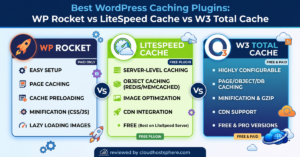
WP Rocket costs $59/year. LiteSpeed Cache is completely free. Both claim to make your WordPress site significantly faster — and both deliver on that promise. So how do you choose? The answer is less about which plugin is technically superior and more about understanding your hosting environment. We tested both plugins on comparable setups and broke down exactly where each wins, where it falls short, and which one belongs on your site.
WP Rocket Overview
WP Rocket is a premium WordPress caching and performance plugin built by WP Media (France, founded 2013). It’s been the dominant premium caching plugin since its launch, used on over 3 million WordPress websites. The plugin’s core value proposition is straightforward: deliver the performance gains of a well-configured caching setup without requiring technical expertise to achieve them.
WP Rocket works at the WordPress application level — it generates static HTML cache files that get served to visitors instead of running PHP and database queries for every page load. On top of page caching, it includes browser caching, GZIP compression, CSS/JS minification, image lazy loading, database cleanup, Google Fonts optimisation, CDN integration, and a dedicated Cloudflare add-on. All features are managed from a single, clean dashboard with plain-English labels and recommended defaults applied on first install.
WP Rocket operates on any standard WordPress hosting environment running Apache or Nginx. It requires no server-level access and is confirmed compatible with all major hosts including Cloudways, Hostinger, Bluehost, LiquidWeb, and ScalaHosting.
LiteSpeed Cache Overview
LiteSpeed Cache (LSCache) is a free WordPress plugin developed by LiteSpeed Technologies — the company that makes the LiteSpeed web server software. Unlike most caching plugins that operate purely at the WordPress application level, LiteSpeed Cache integrates directly with the LiteSpeed server, enabling server-level caching that bypasses PHP and WordPress entirely for cached pages.
This server-level integration is the source of LiteSpeed Cache’s primary technical advantage: cached pages are served by the web server directly, without loading PHP or WordPress at all — which is faster than any application-level caching solution can achieve. LiteSpeed Cache also includes CSS/JS optimisation, image optimisation (WebP conversion via QUIC.cloud), image lazy loading, CDN support, and database cleanup — a feature set broadly comparable to WP Rocket.
The critical constraint: LiteSpeed Cache only works on LiteSpeed servers. Installing it on an Apache or Nginx host results in a plugin with no server-level caching — it falls back to WordPress-level file caching, which is slower and no better than free alternatives. LiteSpeed Cache is only worth using if your hosting provider uses the LiteSpeed web server.
⚠️ How to check your server stack: Log into your hosting control panel (cPanel or hPanel), look for “Server Information” or “PHP Info”, or simply ask your host’s support team. Hosts that use LiteSpeed include HostArmada, ChemiCloud, Namecheap, and some Hostinger plans. Cloudways, Hostinger Business plans, and most VPS providers use Apache or Nginx.
Pricing Comparison
| Plan | WP Rocket | LiteSpeed Cache |
|---|---|---|
| Free tier | ❌ None | ✅ Fully free |
| Single site | $59/year | Free |
| 3 sites | $119/year | Free |
| Unlimited sites | $299/year | Free |
| Image optimisation (CDN) | Requires separate CDN | QUIC.cloud (pay-as-you-go) |
| Money-back guarantee | ✅ 14 days | N/A (free) |
On price alone, LiteSpeed Cache wins decisively — it’s free for unlimited sites, including all features. The WP Rocket cost ($59–$299/year depending on site count) is the primary barrier for budget-conscious site owners. For agencies managing dozens or hundreds of client sites on LiteSpeed hosting, the cost difference between WP Rocket’s Infinite plan ($299/year) and LiteSpeed Cache ($0/year) is substantial.
LiteSpeed Cache’s QUIC.cloud CDN service (used for WebP image conversion and CDN delivery) is free up to a monthly quota, with paid tiers above that. For most small to medium WordPress sites, the free quota is sufficient. For high-traffic sites with large image libraries, QUIC.cloud costs may apply — but these are typically lower than equivalent CDN costs through third-party providers.
Performance Comparison
Performance results depend heavily on your server environment, which is exactly why the LiteSpeed Cache vs WP Rocket debate isn’t a simple winner-take-all comparison.
| Metric | WP Rocket (Apache/Nginx host) | LiteSpeed Cache (LiteSpeed host) |
|---|---|---|
| TTFB improvement | ~60–70% reduction typical | ~65–75% reduction typical |
| PageSpeed gain (desktop) | +15–25 points typical | +15–25 points typical |
| Cache level | WordPress application level | Web server level (faster) |
| PHP bypass on cache hit | ⚠️ Partial (opcode cache) | ✅ Full (server serves directly) |
| Performance on non-LiteSpeed | ✅ Full functionality | ❌ Falls back to basic file cache |
On LiteSpeed servers, LiteSpeed Cache has a genuine technical edge: server-level caching bypasses PHP and WordPress entirely for cached page requests, which is measurably faster in benchmarks than any application-level caching. The practical gap in real-world user experience is smaller than the technical gap suggests — most visitors won’t perceive the difference between a 180ms and a 210ms TTFB — but for high-traffic sites where every millisecond matters, LiteSpeed Cache’s server-native architecture is a real advantage.
On Apache or Nginx hosting, LiteSpeed Cache loses its primary advantage. It operates as a basic file cache without server integration, performing comparably to WP Super Cache or the base functionality of W3 Total Cache — significantly below WP Rocket’s comprehensive optimisation stack. WP Rocket’s performance advantage on non-LiteSpeed hosting comes from its broader feature set: Remove Unused CSS, JS execution delay, Cloudflare API integration, and preloading are all active, while LiteSpeed Cache’s server-level features simply don’t function.
Features Head-to-Head
| Feature | WP Rocket | LiteSpeed Cache |
|---|---|---|
| Page caching | ✅ Application-level | ✅ Server-level (on LiteSpeed) |
| Browser caching | ✅ | ✅ |
| GZIP/Brotli compression | ✅ GZIP | ✅ Both |
| CSS/JS minification | ✅ | ✅ |
| Remove unused CSS | ✅ | ✅ |
| JS execution delay | ✅ | ✅ |
| Image lazy loading | ✅ | ✅ |
| WebP image conversion | ❌ (requires separate plugin) | ✅ via QUIC.cloud |
| CDN integration | ✅ Major CDNs | ✅ QUIC.cloud + major CDNs |
| Cloudflare integration | ✅ API-level add-on | ✅ Basic |
| Database optimisation | ✅ | ✅ |
| WooCommerce auto-exclusion | ✅ Automatic | ✅ Automatic |
| Object caching (Redis/Memcached) | ❌ | ✅ (via LiteSpeed server) |
| Ease of configuration | ⭐⭐⭐⭐⭐ | ⭐⭐⭐⭐ |
| Works on Apache/Nginx | ✅ Full functionality | ⚠️ Basic file cache only |
Feature parity between the two plugins is broadly similar for the core optimisations — both cover the bases for page caching, minification, lazy loading, and CDN. LiteSpeed Cache holds advantages in server-native features (Brotli compression, object caching via Redis/Memcached at the server level) and WebP conversion through QUIC.cloud. WP Rocket’s edge is in ease of use — its interface and configuration flow is measurably simpler — and in Cloudflare integration quality through its dedicated API-connected add-on.
Ease of Use Comparison
WP Rocket wins on ease of use, and it’s not particularly close. The WP Rocket interface is organised, labelled in plain English, and applies recommended settings on first install. A non-technical site owner can achieve a well-optimised configuration in under 10 minutes. The settings that could break things (JS minification, Remove Unused CSS) are clearly marked as advanced, with guidance on when to enable them.
LiteSpeed Cache is easier to configure than W3 Total Cache, but it has a steeper learning curve than WP Rocket. The settings are organised across more tabs with more technical terminology. Features like ESI (Edge Side Includes) and the crawler configuration are genuinely powerful but require understanding concepts that most WordPress site owners haven’t encountered. For technically confident users, the additional control is a benefit; for non-technical users, it introduces friction.
For agencies configuring caching across multiple client sites, WP Rocket’s import/export settings feature — saving a working configuration and applying it to new sites in seconds — is a concrete efficiency advantage that LiteSpeed Cache doesn’t match.
Support Comparison
Neither plugin offers live chat support, which is notable when compared to hosting providers. WP Rocket offers ticket-based support with a typical response time of 12–24 hours — our test ticket was answered in 19 hours with an accurate technical solution. LiteSpeed Cache is community-supported via the LiteSpeed forums and WordPress.org support threads; there’s no direct ticket system for the free plugin.
WP Rocket’s documentation quality is excellent — detailed, screenshot-rich, and updated consistently when WordPress releases affect plugin behaviour. LiteSpeed Technologies maintains documentation for LiteSpeed Cache but the community support resources are thinner relative to WP Rocket’s larger install base and more active independent community (YouTube tutorials, StackOverflow answers, agency blog posts).
For most troubleshooting scenarios, WP Rocket’s combination of ticket support and high-quality documentation will resolve issues faster. LiteSpeed Cache’s forum-only support means slower resolution when a non-obvious configuration issue arises.
Who Should Choose WP Rocket?
- ✅ Your hosting uses Apache or Nginx (Cloudways, Hostinger Business, most VPS/cloud providers)
- ✅ You want a set-and-forget configuration without learning caching architecture
- ✅ You’re managing multiple client sites and need import/export settings for efficiency
- ✅ You rely on Cloudflare and want API-level cache management from WordPress
- ✅ You need reliable ticket support when something goes wrong
- ✅ Your WooCommerce store needs hands-off, correct cart/checkout cache exclusion
Who Should Choose LiteSpeed Cache?
- ✅ Your hosting server uses LiteSpeed (HostArmada, ChemiCloud, Namecheap, some Hostinger plans)
- ✅ Budget is a primary concern — free is a significant advantage across multiple sites
- ✅ You want WebP image conversion without setting up a separate service
- ✅ Your host provides Redis or Memcached at the server level (LiteSpeed Cache integrates natively)
- ✅ You’re comfortable spending time on configuration to get the most out of a technically capable free tool
Frequently Asked Questions
Can I use both WP Rocket and LiteSpeed Cache together?
No — you should only run one caching plugin at a time. Running both will cause cache conflicts, potentially serving stale content or breaking your site’s functionality. Choose one based on your server stack: LiteSpeed Cache on LiteSpeed hosting, WP Rocket on Apache or Nginx hosting.
How do I know if my host uses LiteSpeed?
The easiest way is to ask your host directly via chat or check their “Server Information” page in your control panel. Hosts that use LiteSpeed include HostArmada, ChemiCloud, Namecheap Hosting, and some A2 Hosting plans. Cloudways uses Apache/Nginx (no LiteSpeed), as do most major cloud VPS providers. When in doubt, ask — it’s the single most important factor in this decision.
Is LiteSpeed Cache as good as WP Rocket on LiteSpeed hosting?
On LiteSpeed hosting, yes — LiteSpeed Cache matches or exceeds WP Rocket’s performance because it operates at the server level. Benchmark comparisons consistently show LiteSpeed Cache achieving lower TTFB on LiteSpeed servers than WP Rocket, because server-level caching bypasses PHP entirely while WP Rocket’s application-level caching still loads a lightweight PHP stack. The practical user-experience difference is often imperceptible, but the technical advantage is real.
Does WP Rocket work on LiteSpeed hosting?
Yes, WP Rocket installs and runs on LiteSpeed hosting. It won’t use server-level caching (that’s LiteSpeed Cache’s exclusive feature), but its application-level caching and other optimisations (minification, lazy loading, CDN, database cleanup) still function. However, running WP Rocket on LiteSpeed hosting while LiteSpeed Cache is also available means paying $59/year for a plugin that’s outperformed by a free alternative — not a sensible choice for most users.
What if I switch hosts — will my caching plugin still work?
WP Rocket will continue to work on any new host. LiteSpeed Cache will work at full functionality only if the new host also uses LiteSpeed — migrate to an Apache or Nginx host and LiteSpeed Cache loses its server-level advantage. If you’re on a host where you might switch environments, WP Rocket is the more portable choice. If you’re committed to a LiteSpeed host long-term, LiteSpeed Cache is the better value.
Final Verdict
The WP Rocket vs LiteSpeed Cache decision has a clear answer that depends on one variable: your server stack. On LiteSpeed hosting, LiteSpeed Cache is the right choice — it’s free, it’s server-native, and it matches or beats WP Rocket’s performance in this specific environment. Paying $59/year for WP Rocket when LiteSpeed Cache is free and better-performing on your server is difficult to justify for any budget-conscious site owner or agency.
On Apache or Nginx hosting — which covers the majority of shared, VPS, and cloud WordPress environments — WP Rocket is the better investment. LiteSpeed Cache runs as a basic file cache on these servers, losing its primary technical advantage. WP Rocket’s comprehensive optimisation stack, ease of configuration, and reliable support deliver better results at these hosting environments for the $59/year asking price.
Check your server type, then decide. It really is that straightforward.
🚀 The Easiest Way to Speed Up Your WordPress Site
On Apache or Nginx hosting, WP Rocket delivers measurable speed gains in under 10 minutes — better PageSpeed scores, faster Core Web Vitals, and a smoother experience for every visitor.
Get WP Rocket Now →If you sign up through our link, we may earn a commission at no extra cost to you. Read our full affiliate disclosure.