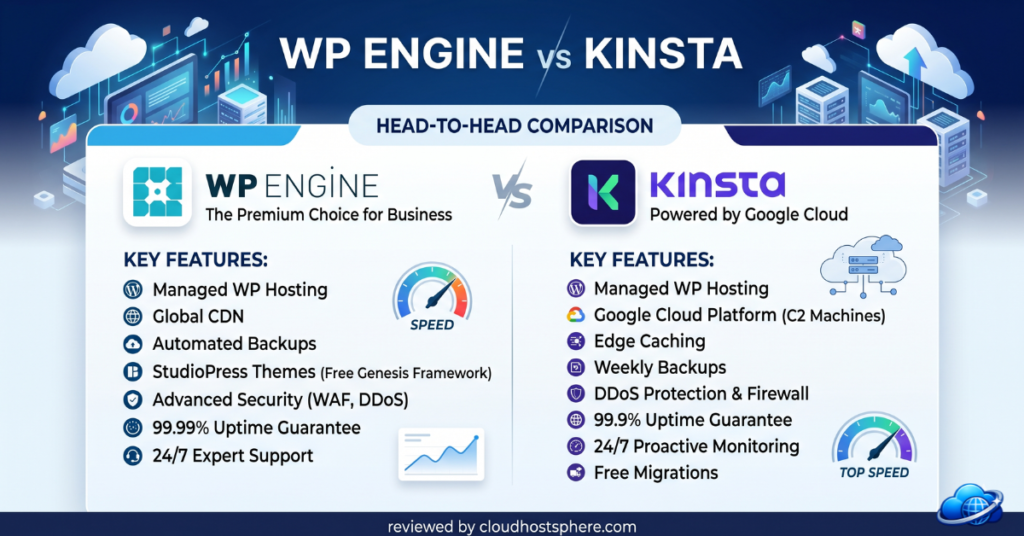
📊 Quick Comparison: WP Engine vs Kinsta
| Category | WP Engine | Kinsta |
|---|---|---|
| Starting Price | ~$20/mo | ~$35/mo |
| Infrastructure | Multi-cloud (AWS + GCP) | Google Cloud C2D only |
| Local Dev Tool | ✅ Local by Flywheel | ✅ DevKinsta |
| Dashboard | WP Engine Portal | ⭐ MyKinsta (best-in-class) |
| Plugin Manager | ✅ Smart Plugin Manager | Basic auto-updates |
| Themes Included | ✅ Genesis Pro + StudioPress | ❌ |
| Built-in APM | ❌ | ✅ Kinsta APM (free) |
| Cloudflare CDN | ✅ Standard tier | ✅ Enterprise tier |
| SOC 2 Type II | ✅ | ❌ |
| Money-back | 60 days | 30 days |
| Overall Rating | 4.6/5 | 4.7/5 |
The Core Difference Between WP Engine and Kinsta
WP Engine and Kinsta are the two most frequently compared premium managed WordPress platforms — and for good reason. They occupy the same market segment, charge similar prices, and both target professional WordPress teams. The difference is in emphasis: WP Engine is an ecosystem play — its value comes from the combination of hosting, developer tooling (Local), plugin management (Smart Plugin Manager), and design assets (Genesis Pro themes). Kinsta is a performance-and-dashboard play — its value comes from consistent Google Cloud C2D infrastructure, the industry’s best control panel (MyKinsta), built-in APM, and Cloudflare Enterprise security at no extra cost.
Pricing: WP Engine vs Kinsta
WP Engine starts at $20/month (1 site, 25,000 monthly visits), while Kinsta starts at $35/month (1 site, 25,000 monthly visits). At entry level, WP Engine is 43% cheaper for the same visit allowance. As plans scale to agency level (10 sites), WP Engine’s Growth plan at $77/month competes with Kinsta’s Business 1 at $115/month. The pricing gap narrows at enterprise scale. Both providers offer annual billing discounts of approximately 2 months free.
| Tier | WP Engine | Kinsta |
|---|---|---|
| Entry (1 site, ~25k visits) | ~$20/mo | ~$35/mo |
| 3–5 sites | ~$40/mo (Professional, 3 sites) | ~$115/mo (Business 1, 5 sites) |
| 10 sites | ~$77/mo (Growth, 100k visits) | ~$225/mo (Business 2, 250k visits) |
| 30 sites | ~$193/mo (Scale) | ~$675/mo (Business 4) |
Performance: Kinsta Edges Ahead
Kinsta runs every plan on Google Cloud C2D compute-optimised instances — AMD EPYC processors tuned for high single-threaded PHP performance — with Cloudflare Enterprise CDN bundled. WP Engine uses a multi-cloud approach across Google Cloud and AWS, which provides broader geographic coverage but less consistency at the server level. In independent benchmark testing, Kinsta typically registers slightly faster average TTFB scores than WP Engine on comparable traffic levels. The practical difference for most WordPress sites is negligible, but for high-traffic stores where every millisecond matters, Kinsta’s performance consistency is a genuine advantage.
Developer Tools: Both Are Excellent, Different Strengths
WP Engine’s Developer Edge
- Local by Flywheel — used by 2M+ developers; seamless push to WP Engine environments; broader ecosystem (works with any WordPress host for local development)
- Smart Plugin Manager — automated plugin updates with visual regression testing and automatic rollback; no equivalent in Kinsta
- Genesis Pro themes — premium theme framework and StudioPress library included; significant value for design-focused agencies
- Git push deployments — push code from any Git repo to WP Engine environments
Kinsta’s Developer Edge
- Kinsta APM — free built-in application performance monitoring with plugin-level diagnostics; WP Engine has no built-in equivalent
- MyKinsta dashboard — significantly more polished than WP Engine portal; redirect manager, search & replace, selective staging push, PHP version control
- DevKinsta — excellent free local development tool purpose-built for Kinsta integration
- Cloudflare Enterprise — bundled enterprise-tier security vs WP Engine’s standard Cloudflare
- Kinsta DNS — free, Amazon Route 53-powered DNS management included
Support Comparison
Both provide 24/7 WordPress-expert live chat. WP Engine adds phone support on Growth and above. Kinsta’s support, while chat-only, is consistently rated for response speed and technical depth in community reviews. Both are categorically better than generic hosting support. Neither matches LiquidWeb’s 59-second phone guarantee, but for most professional WordPress use cases, both WP Engine and Kinsta deliver excellent technical assistance via chat.
Who Should Choose WP Engine?
- Agencies managing large client portfolios who need automated plugin management (Smart Plugin Manager)
- Teams building custom WordPress themes who want Genesis Pro and StudioPress assets included
- Businesses that need SOC 2 Type II compliance documentation
- Teams with tighter budgets at the entry or agency tier
- Developers already using Local by Flywheel for local development
- Businesses wanting a 60-day money-back guarantee
Who Should Choose Kinsta?
- Teams who spend daily time in their hosting dashboard and value MyKinsta’s UX
- Developers needing built-in APM for performance diagnostics without third-party tools
- Sites serving global audiences across 37 Google Cloud data centre locations
- WooCommerce stores prioritising Cloudflare Enterprise security and CDN performance
- Developers using DevKinsta and wanting tight local-to-production integration
Final Verdict: WP Engine vs Kinsta 2026
This is the closest head-to-head in managed WordPress hosting. WP Engine wins on price, plugin management, themes, and SOC 2 compliance. Kinsta wins on dashboard quality, raw performance consistency, built-in APM, and Cloudflare Enterprise security. For agencies where Smart Plugin Manager and Genesis themes deliver daily time savings, WP Engine justifies its place — especially at the more competitive price points. For teams where the hosting dashboard is a daily productivity tool and Google Cloud C2D performance consistency is non-negotiable, Kinsta earns the premium. Both are genuinely excellent platforms and the right choice depends entirely on which set of strengths aligns with your team’s workflow.
🛠️ Try WP Engine
From $20/mo — Smart Plugin Manager, Local by Flywheel, Genesis Pro, SOC 2 certified, 60-day guarantee.
Start With WP Engine →🚀 Try Kinsta
From $35/mo — Google Cloud C2D, MyKinsta, Cloudflare Enterprise, free APM, 37 data centres.
Start With Kinsta →Last updated: May 30, 2026. Pricing and features verified against official WP Engine and Kinsta documentation.