⚡ Quick Verdict
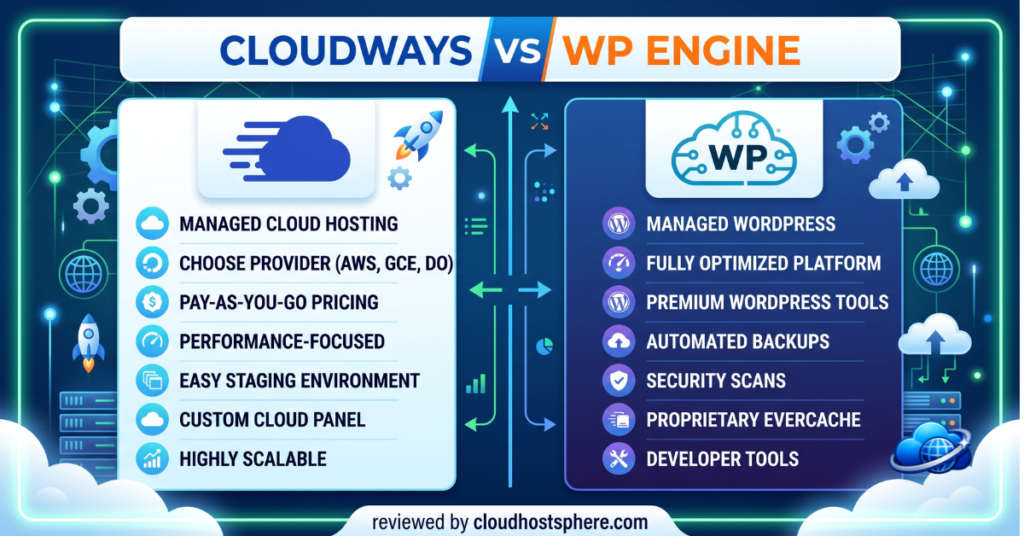
Cloudways wins on price, flexibility, and value. It gives you a choice of five cloud providers (DigitalOcean, Vultr, Google Cloud, AWS, Linode), lets you host unlimited sites on a single server, and starts from $14/mo — making it the smarter pick for developers, freelancers, and growing sites that want managed convenience without a managed price tag.
WP Engine wins on all-in-one WordPress management. It includes staging environments, smart plugin updates, local development tools, Genesis Pro themes, and hands-off maintenance built in. It costs more, but for agencies managing multiple client sites, that overhead is worth every penny.
✅ Choose Cloudways if: You want to control your stack, get more server for your money, or run multiple sites without paying per-site fees.
✅ Choose WP Engine if: You manage client sites, need staging + automated updates, or want a fully white-glove managed experience.
Overall Winner by Category: Price → Cloudways | Features → WP Engine | Best Value → Cloudways
Cloudways vs WP Engine: The Basics
Both Cloudways and WP Engine are in the “managed WordPress hosting” category, but they approach it from very different angles. Cloudways is a managed cloud platform — it sits on top of actual cloud infrastructure (AWS, Google Cloud, DigitalOcean, etc.) and manages the technical layer for you. WP Engine is a purpose-built WordPress platform with its own proprietary infrastructure and a suite of tools built specifically for WordPress agencies and developers.
The short version: Cloudways gives you more raw power and value per dollar. WP Engine gives you more WordPress-specific tooling and a more hands-off experience. Neither is objectively “better” — they serve different needs.
Performance: How Do They Actually Compare?
Both hosts deliver excellent WordPress performance, but the way they achieve it differs significantly.
Cloudways Performance
Cloudways performance depends heavily on which cloud provider you choose. Selecting Google Cloud or AWS gives you the same infrastructure WP Engine uses — at a fraction of the price. On DigitalOcean (the most popular Cloudways choice), performance is excellent for most WordPress sites up to mid-traffic levels. Cloudways uses Nginx + Apache stack with built-in Varnish-level caching via Breeze (their custom cache plugin), Redis object caching, and PHP 8.x by default.
In independent benchmark tests, Cloudways on Google Cloud routinely scores under 500ms TTFB and handles over 1,000 concurrent users without breaking a sweat on mid-tier plans. Choosing the right cloud provider matters — Google Cloud and AWS push it closer to WP Engine territory in raw speed.
WP Engine Performance
WP Engine runs on Google Cloud exclusively and has invested heavily in its EverCache® technology — a proprietary page caching layer engineered specifically for WordPress. Their CDN (via Cloudflare) is global and included on all plans. The result is consistently fast load times with minimal configuration needed on your part.
WP Engine also includes Global Edge Security — a Cloudflare-powered network layer that combines DDoS protection, WAF, and CDN in one. For most users, WP Engine’s managed approach means you never think about caching — it just works.
⚡ Performance verdict: Both are fast. Cloudways on GCP or AWS matches WP Engine’s speed at lower cost. WP Engine wins on ease — zero config required. Cloudways wins on flexibility — you can tune the stack yourself.
Pricing: Where the Real Difference Lies
⚠️ Pricing shown below is based on publicly available data as of June 2026. Always verify current rates at cloudways.com and wpengine.com before purchasing.
Cloudways Pricing
| Cloud Provider | RAM | Storage | Bandwidth | Price/mo |
|---|---|---|---|---|
| DigitalOcean | 1 GB | 25 GB SSD | 1 TB | ~$14 |
| DigitalOcean | 2 GB | 50 GB SSD | 2 TB | ~$28 |
| Vultr High Freq | 1 GB | 32 GB NVMe | 1 TB | ~$15 |
| Google Cloud | 1 GB | 20 GB SSD | 2 TB | ~$37 |
| AWS | 1 GB | 20 GB SSD | 2 TB | ~$36 |
Cloudways charges per server, not per site. You can host 5, 10, or 50 WordPress installs on the same $28/mo DigitalOcean server (within its resource limits). This is the single biggest value advantage Cloudways holds over WP Engine.
WP Engine Pricing
| Plan | Sites | Monthly Visits | Storage | Price/mo |
|---|---|---|---|---|
| Startup | 1 | 25,000 | 10 GB | ~$20 |
| Professional | 3 | 75,000 | 15 GB | ~$40 |
| Growth | 10 | 100,000 | 20 GB | ~$77 |
| Scale | 30 | 400,000 | 50 GB | ~$193 |
WP Engine charges per site (per plan tier). Moving from 1 site to 3 doubles the price. For agencies managing 10+ client sites, this adds up fast. The value equation is different though: WP Engine includes tools (staging, Smart Plugin Manager, 35+ Genesis themes) that would cost extra elsewhere.
Features Comparison
| Feature | Cloudways | WP Engine |
|---|---|---|
| Staging environments | ✅ (1-click clone) | ✅ (built-in) |
| Automated backups | ✅ (hourly/daily) | ✅ (daily, 30 days) |
| Free SSL | ✅ Let’s Encrypt | ✅ included |
| Free CDN | ✅ Cloudflare (free tier) | ✅ Global CDN included |
| Dev tools (SSH, SFTP) | ✅ | ✅ SSH Gateway |
| Smart Plugin Manager | ❌ | ✅ (auto-updates + visual diff) |
| Local dev environment | ❌ | ✅ Local by Flywheel |
| Premium themes included | ❌ | ✅ 35+ Genesis themes |
| Sites per plan | Unlimited | 1–30 per tier |
| White label | ✅ (agency plan) | ✅ |
| Team collaboration | ✅ | ✅ |
| Managed WordPress updates | Partial | ✅ Full |
Customer Support
Support quality is one of the most important differentiators in managed hosting — and both hosts do well here, though in different ways.
Cloudways offers 24/7 live chat and a ticketing system on all plans. Phone support is available on higher tiers. Their support team is knowledgeable about server-level issues and general WordPress problems. Response times are typically fast (under 5 minutes on live chat). For complex custom configurations, you may hit the limits of what they’ll help with — they support the platform, not necessarily your custom plugin conflicts.
WP Engine offers 24/7 live chat and phone support on all plans, including their entry-level Startup plan. Their support team is WordPress-specific — they’ll dig into theme conflicts, plugin issues, and even help debug custom code to a reasonable degree. Their average response times on live chat are consistently under 2 minutes. For WordPress-heavy users, this depth of WordPress expertise is genuinely valuable.
💬 Support verdict: WP Engine edges ahead — phone support on all plans, WordPress-specific expertise, and slightly faster response times. Cloudways is strong but WP Engine is better for non-technical users who may need hand-holding.
Security
Both platforms take security seriously at the infrastructure level.
Cloudways includes free SSL, IP whitelisting, two-factor authentication, and bot protection (via Cloudflare). Their managed servers get OS-level security patches and firewall rules. They also offer an optional add-on (Cloudways Bot Protection powered by Cloudflare) for additional WAF coverage.
WP Engine includes Global Edge Security powered by Cloudflare on all plans — a WAF, DDoS protection, and CDN all in one. They also block known malicious plugins by default and run a proprietary threat intelligence system. If your site gets hacked, WP Engine will remediate it for free (this is rare but valuable for agencies with client liability concerns).
Who Should Choose Cloudways?
Cloudways is ideal for:
- Developers and technically-comfortable site owners
- Freelancers or agencies hosting multiple sites on one server
- Sites that need root-level control or custom server configs
- Anyone who wants managed cloud without paying per-site premiums
- Businesses growing past shared hosting and watching costs carefully
If you’re comfortable with basic SSH or just want a control panel that isn’t confusing, Cloudways delivers excellent value. Our full Cloudways review covers everything about the platform in detail.
Who Should Choose WP Engine?
WP Engine is ideal for:
- WordPress agencies managing multiple client sites
- Businesses that need hands-off plugin and WordPress core updates
- Teams using Local by Flywheel for development workflows
- Sites where downtime = client calls at 2am and you want SLA backup
- Publishers who want 35+ premium Genesis themes included at no extra cost
Cloudways vs WP Engine: Final Verdict
| Category | Winner | Why |
|---|---|---|
| Price / Value | 🏆 Cloudways | Unlimited sites per server, starting $14/mo |
| Performance | 🤝 Tie | Both fast; Cloudways matches WP Engine on GCP/AWS |
| Ease of Use | 🏆 WP Engine | More managed, less config required |
| WordPress Tools | 🏆 WP Engine | Smart Plugin Manager, Local, Genesis themes |
| Support | 🏆 WP Engine | Phone on all plans, deeper WP expertise |
| Scalability | 🏆 Cloudways | Choose your cloud provider, scale vertically/horizontally |
| Security | 🏆 WP Engine | Global Edge Security on all plans |
Bottom line: Most independent site owners, bloggers, and growing businesses will get better value from Cloudways. Most agencies, enterprise teams, and businesses that want maximum WordPress automation will get more out of WP Engine — and justify the higher price. For a deeper look at both individually, read our Cloudways review and WP Engine review. Also see our Best Managed WordPress Hosting roundup for more options.
Ready to Choose?
If price and flexibility matter most, Cloudways gives you managed cloud hosting starting at $14/mo with unlimited sites. If agency features and full WordPress automation matter more, WP Engine is worth the premium.
Start with Cloudways → View WP Engine Plans →
Affiliate disclosure: Cloudways links on this page are affiliate links. If you sign up, we may earn a commission at no extra cost to you. Learn more.