⚡ Quick Summary
The right caching plugin depends on your host and setup — not every plugin works equally well on every server. Here’s the short version:
- 🏆 WP Rocket — Best overall. Easiest setup, most features, works on any host. Best choice if you want one plugin that handles everything without touching code.
- ⚡ LiteSpeed Cache — Best free option if your host runs LiteSpeed servers (Hostinger, ChemiCloud, HostArmada, GreenGeeks, A2 Hosting). Server-level caching, zero config required.
- 🔧 W3 Total Cache — Most configurable. Good for developers who want granular control. Steep learning curve.
- 🟢 WP Super Cache — Simplest free option. Works on Apache servers. Good starting point for beginners.
Why WordPress Caching Matters
Every time someone visits a WordPress page without caching, the server runs a series of PHP processes and database queries to build that page from scratch. For a typical WordPress post, that might mean 30–80 database queries per page load. Multiply that by your daily visitor count and you’re putting significant strain on your server — and your visitors are waiting longer than necessary.
Caching solves this by generating a static HTML version of each page and serving that pre-built file to visitors instead of rebuilding it each time. The result: dramatically faster load times, lower server resource usage, and better Google PageSpeed scores. A well-configured caching plugin is one of the single biggest performance improvements you can make to a WordPress site.
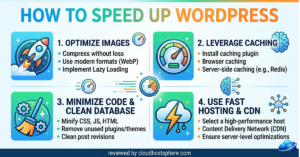
For context: our guide on how to speed up WordPress covers caching alongside image optimisation, CDN setup, and code minification — caching typically accounts for the largest single improvement of any of those steps.
Types of WordPress Caching
Before comparing plugins, it helps to understand the different types of caching — because the best plugins combine several of these:
| Type | What It Does |
|---|---|
| Page caching | Stores full HTML copies of pages, serves them without PHP/DB overhead |
| Browser caching | Tells visitors’ browsers to save static assets locally, reducing repeat-visit load times |
| Object caching | Caches database query results in memory (Redis/Memcached) — critical for WooCommerce |
| Opcode caching | Caches compiled PHP code — usually handled at server level (PHP OPcache) |
| CDN integration | Serves cached static files from servers closest to each visitor globally |
| Minification | Removes whitespace/comments from HTML, CSS, JS to reduce file sizes |
The best caching plugins handle most or all of these layers in a single interface. Let’s look at the top four options.
1. WP Rocket — Best Overall Caching Plugin
Best for: Most WordPress sites — regardless of host. Easiest to configure. Most comprehensive feature set.
Price: From $59/year (1 site) | $119/year (3 sites) | $299/year (unlimited)
Free version: No
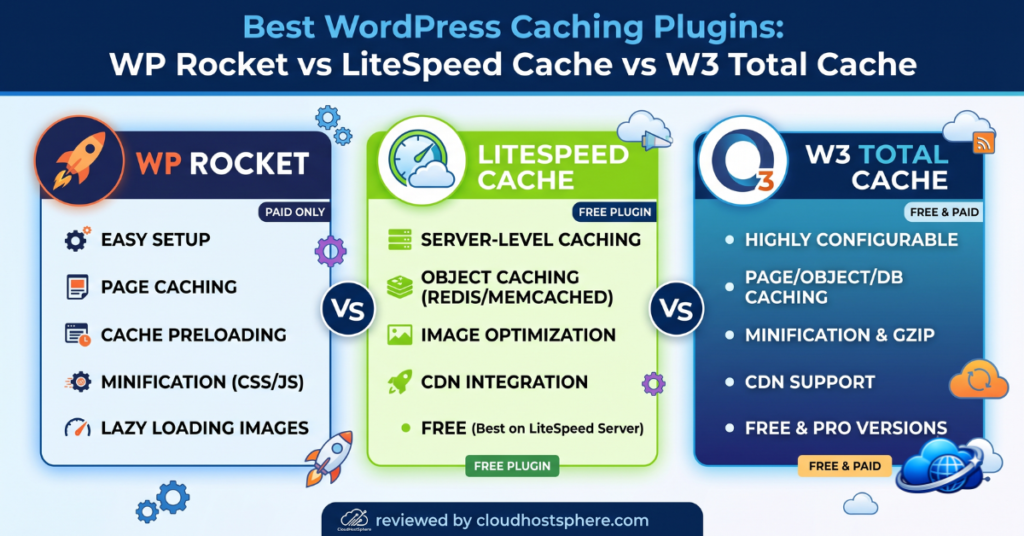
WP Rocket is the gold standard of WordPress caching plugins. It’s not free — but it earns its price. Out of the box, with default settings, WP Rocket activates page caching, browser caching, GZIP compression, and lazy loading for images. Most sites see a meaningful speed improvement within 5 minutes of installation without touching a single advanced setting.
What WP Rocket Includes
- Page caching — enabled automatically on activation
- Cache preloading — crawls your site and pre-builds the cache proactively
- GZIP compression — reduces file sizes before delivery
- Browser caching — sets proper cache-control headers
- HTML/CSS/JS minification — optional, with safe defaults
- CSS/JS file combining — reduces HTTP requests
- Lazy loading — images and iframes load only when in viewport
- Database optimisation — cleans up post revisions, transients, spam comments
- CDN integration — works with Cloudflare, BunnyCDN, and others via RocketCDN
- Remove unused CSS — generates critical CSS per page (premium feature, powerful)
- WordPress Multisite support — network-wide caching management
WP Rocket works on any host — Apache, Nginx, LiteSpeed. It requires no server-level configuration and is actively compatible with all major page builders (Elementor, Divi, Beaver Builder) and WooCommerce. Their support team also provides hands-on help with configuration if you get stuck.
For a complete breakdown, see our full WP Rocket review.
💡 WP Rocket verdict: The easiest, most comprehensive caching solution for WordPress. If you don’t want to think about performance configuration and just want it to work — WP Rocket is the answer. The $59/year cost pays for itself in better Core Web Vitals and user experience.
2. LiteSpeed Cache — Best Free Plugin for LiteSpeed Hosts
Best for: Sites hosted on LiteSpeed servers (Hostinger, ChemiCloud, HostArmada, GreenGeeks, A2 Hosting, many others).
Price: Free (with optional paid QUIC.cloud credits for image optimisation)
Free version: Yes — full caching features are free
LiteSpeed Cache (LSCache) is unique — it’s the only caching plugin that integrates directly with the web server at the OS level. When your host runs LiteSpeed Enterprise or OpenLiteSpeed, LSCache bypasses PHP entirely for cached page delivery. The server responds with a pre-built page without loading WordPress at all. This is fundamentally faster than any PHP-based caching plugin, including WP Rocket.
The catch: it only works properly on LiteSpeed servers. On Apache or Nginx hosts, it falls back to standard PHP caching and loses its primary advantage. If your host doesn’t run LiteSpeed, choose WP Rocket or W3 Total Cache instead.
What LiteSpeed Cache Includes
- Server-level page caching — bypasses PHP when fully integrated with LiteSpeed
- Object caching — Redis and Memcached support
- Image optimisation — via QUIC.cloud (free tier available)
- WebP conversion — converts JPEG/PNG to WebP automatically
- CSS/JS minification and combining
- Lazy loading for images and iframes
- Browser caching headers
- CDN support — works with QUIC.cloud CDN and third-party CDNs
- WooCommerce optimisation — smart cache exclusion rules for cart/checkout pages
- ESI (Edge Side Includes) — allows caching of pages with dynamic widgets (logged-in users, etc.)
For sites on Hostinger, ChemiCloud, or HostArmada, LiteSpeed Cache is the best performing and most cost-effective caching solution available — and it’s completely free. You should use it over any other option on those hosts.
💡 LiteSpeed Cache verdict: If your host runs LiteSpeed servers, this is the best caching plugin available — and it’s free. Nothing beats server-level caching integration. On non-LiteSpeed hosts, choose WP Rocket instead.
3. W3 Total Cache — Most Configurable Option
Best for: Developers and advanced users who want granular control over every caching layer.
Price: Free (Pro version at $99/year adds CDN previews, extensions)
Free version: Yes — full feature set is available free
W3 Total Cache (W3TC) is the most powerful free caching plugin available — but also the most complex. Its settings panel is extensive: page cache, database cache, object cache, browser cache, minify, CDN, and more, each with dozens of sub-options. For developers who know what they’re doing, this level of control is valuable. For beginners, it’s genuinely overwhelming.
W3TC works on any host and supports the widest range of object cache backends (Memcached, Redis, APC, disk). It has native CDN integration with most major providers including Cloudflare, MaxCDN, Amazon CloudFront, and others. For high-traffic sites with complex caching requirements, W3TC can be tuned to match or exceed WP Rocket’s performance — but it takes time and expertise to configure correctly.
Common issues with W3TC: misconfiguration can break your site or cause JavaScript errors. The interface hasn’t been redesigned in years and feels dated. For most users, the configuration complexity isn’t worth it when WP Rocket achieves the same results out of the box with sensible defaults.
💡 W3 Total Cache verdict: Powerful and free, but complex. Use it if you’re a developer who wants full control. Otherwise, WP Rocket gives you better results with far less risk of misconfiguration.
4. WP Super Cache — Best Free Option for Beginners
Best for: Simple WordPress blogs on Apache hosting that need a no-fuss free cache.
Price: Free
Free version: Yes — this is the only version
WP Super Cache is developed by Automattic (the company behind WordPress.com) and focuses on doing one thing well: static page caching. It doesn’t have the feature depth of WP Rocket or W3TC — no minification, no CSS/JS combining, no object cache integration. But it’s very simple to set up (Enable Caching → Save → done), very stable, and very unlikely to break anything.
It’s a solid starting point for a simple blog on shared hosting. Once your site grows and you need more, upgrade to WP Rocket. WP Super Cache doesn’t offer much of a migration path — you just deactivate it and install WP Rocket.
Plugin Comparison: Side by Side
| Feature | WP Rocket | LiteSpeed Cache | W3 Total Cache | WP Super Cache |
|---|---|---|---|---|
| Page caching | ✅ | ✅ (server-level) | ✅ | ✅ |
| Browser caching | ✅ | ✅ | ✅ | ✅ |
| Object caching | ✅ | ✅ | ✅ | ❌ |
| Minification | ✅ | ✅ | ✅ | ❌ |
| Lazy loading | ✅ | ✅ | ✅ | ❌ |
| Image optimisation | ✅ (via Imagify) | ✅ (QUIC.cloud) | ❌ | ❌ |
| CDN integration | ✅ | ✅ | ✅ | Partial |
| Cache preloading | ✅ | ✅ | ✅ | ❌ |
| Remove unused CSS | ✅ | ❌ | ❌ | ❌ |
| WooCommerce optimisation | ✅ | ✅ | Partial | ❌ |
| Ease of setup | ⭐⭐⭐⭐⭐ | ⭐⭐⭐⭐ | ⭐⭐ | ⭐⭐⭐⭐⭐ |
| Price | $59+/year | Free | Free | Free |
Which Caching Plugin Should You Use?
Here’s a simple decision guide based on your situation:
🏆 Use WP Rocket if:
- Your host runs Apache or Nginx (Cloudways, Bluehost, WP Engine, Kinsta, etc.)
- You want the best results with minimal configuration
- You run WooCommerce and need smart cart/checkout cache exclusions
- You want “Remove Unused CSS” to improve Core Web Vitals LCP/CLS scores
- You’re comfortable with a $59/year investment in performance
⚡ Use LiteSpeed Cache if:
- Your host runs LiteSpeed (Hostinger, ChemiCloud, HostArmada, GreenGeeks, A2 Hosting)
- You want maximum performance at zero cost
- You’re happy to spend 30 minutes learning its settings panel
🔧 Use W3 Total Cache if:
- You’re a developer who wants granular control over every cache layer
- You need specific CDN or object cache backend configurations
- You’re comfortable with complex settings and testing changes carefully
🟢 Use WP Super Cache if:
- You’re a complete beginner on a simple Apache shared host
- You want caching enabled in 2 clicks with no risk of breaking anything
- You’ll upgrade to WP Rocket once your site grows
Important: Don’t Use Two Caching Plugins at Once
Running two caching plugins simultaneously will cause conflicts — corrupted cache files, broken pages, or unpredictable behaviour. If you’re switching from WP Super Cache or W3 Total Cache to WP Rocket, deactivate and delete the old plugin first, then install WP Rocket. If your host provides a built-in caching solution (like Cloudways’ Breeze or WP Engine’s EverCache), check whether you should disable it before adding WP Rocket — most host-level caches work fine alongside WP Rocket, but verify with your host’s documentation.
Final Recommendation
For most WordPress site owners, the choice comes down to two plugins: WP Rocket if you’re on Apache/Nginx hosting, or LiteSpeed Cache if your host uses LiteSpeed servers. Both are excellent. Both will make a measurable difference to your site’s load time, Google PageSpeed score, and user experience.
The $59/year for WP Rocket is well spent — better load times convert to lower bounce rates, better SEO rankings, and more revenue over time. For most sites, it pays for itself within the first month of better performance. For more WordPress speed tips, see our complete guide: How to Speed Up WordPress: 10 Steps That Actually Work.
Get WP Rocket — The Easiest WordPress Speed Plugin
WP Rocket activates page caching, browser caching, GZIP, and lazy loading the moment you install it. No server knowledge required. Works on any WordPress host.
Affiliate disclosure: This is an affiliate link. If you purchase, we may earn a commission at no extra cost to you. Learn more.