If you’ve ever wondered why some websites load instantly while others take three or four seconds to appear, a CDN is often the difference. We’ve tested dozens of WordPress setups with and without CDNs, and the performance gap is consistently significant — sometimes cutting page load times in half. But what exactly is a CDN, and does your WordPress site actually need one? This guide answers both questions plainly.
What Is a CDN?
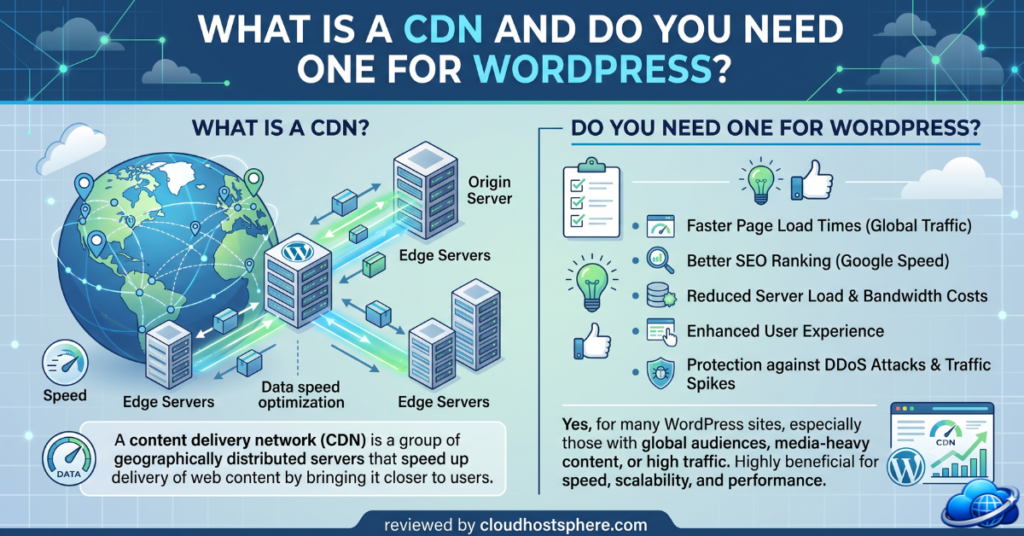
CDN stands for Content Delivery Network. It’s a globally distributed network of servers — called edge nodes or PoPs (Points of Presence) — that store cached copies of your website’s static assets (images, CSS, JavaScript, fonts) and deliver them to visitors from the server geographically closest to them.
Without a CDN, every visitor — regardless of where they are in the world — fetches content from your single origin server. If your server is in New York and your visitor is in Sydney, every asset has to travel halfway around the globe. With a CDN, a cached copy of your site’s assets sits in a Sydney edge node, and that Sydney visitor gets them almost instantly.
How a CDN Works — Step by Step
- 1. First visitor hits your origin server — the CDN doesn’t have a cached copy yet, so it fetches the content from your origin (your actual web host)
- 2. CDN caches the content at the nearest edge node — the response is stored at the edge node closest to that first visitor’s location
- 3. Subsequent visitors in that region get the cached copy — instead of hitting your origin server, they get the cached version from the nearby edge node in milliseconds
- 4. Cache expires or content changes — the CDN fetches a fresh copy from your origin and re-caches it at the edge
What Does a CDN Actually Speed Up?
CDNs primarily accelerate the delivery of static assets — files that don’t change per visitor:
- Images (JPEG, PNG, WebP, SVG)
- CSS stylesheets
- JavaScript files
- Web fonts
- PDF and document downloads
- Video files (for sites hosting their own video)
What CDNs don’t typically cache: dynamic HTML pages generated by WordPress (logged-in user views, WooCommerce cart pages, search results). These must still be generated by your origin server. However, some CDNs (like Cloudflare) offer page caching at the edge for anonymous visitors, which can cache even dynamic WordPress pages in certain configurations.
Do You Actually Need a CDN for Your WordPress Site?
The honest answer: it depends on your site and audience. Here’s how to decide:
You definitely need a CDN if:
- ✅ Your audience is global or spread across multiple continents
- ✅ Your site is image-heavy (photography, e-commerce product images, portfolios)
- ✅ You’re targeting Google Core Web Vitals scores and want to improve LCP (Largest Contentful Paint)
- ✅ Your current host is geographically far from a significant portion of your visitors
- ✅ You’re running a WooCommerce store where page speed directly impacts conversion rate
A CDN will help but isn’t critical if:
- ⚠️ Your audience is primarily local or regional (e.g., a local business in one city)
- ⚠️ Your site is mostly text with few images
- ⚠️ You’re already on a managed host with a built-in CDN (Cloudways, Kinsta, and others include CDN as standard)
You probably don’t need a separate CDN if:
- ❌ You’re on a managed WordPress host that already includes a CDN — adding a second CDN layer rarely helps and can cause caching conflicts
- ❌ Your site has very low traffic and all your visitors are in the same country as your server
CDN Options for WordPress
Cloudflare (Free + Paid)
Cloudflare is the most widely used CDN for WordPress. The free tier includes a global CDN, DDoS protection, and basic WAF — enough for most small to medium sites. Cloudflare works as a DNS-level proxy, meaning all traffic to your site passes through Cloudflare’s network before reaching your origin server. Setup requires pointing your domain’s nameservers to Cloudflare — a one-time 5-minute process.
BunnyCDN
BunnyCDN offers excellent global coverage at very low cost (around $0.01 per GB for most regions). It integrates well with WordPress via plugins like CDN Enabler or WP Offload Media. A strong choice if Cloudflare’s DNS proxy model causes conflicts with your setup.
CDN Included With Your Managed Host
Many managed WordPress hosts include a CDN as standard. Cloudways includes a premium CDN (powered by Cloudflare Enterprise) that can be activated with a click — no separate account or DNS change required. This is the simplest path for most WordPress site owners.
Try Cloudways With Built-In CDN →
How to Set Up a CDN on WordPress
Option A: Use Cloudflare (DNS-level)
- Step 1: Create a free Cloudflare account at cloudflare.com
- Step 2: Add your domain and let Cloudflare scan your existing DNS records
- Step 3: Update your domain’s nameservers to the two Cloudflare nameservers provided (done at your domain registrar)
- Step 4: Wait for DNS propagation (usually 5–30 minutes)
- Step 5: Install the official Cloudflare WordPress plugin to enable automatic cache purging on post updates
Option B: Use a CDN Plugin (e.g., BunnyCDN)
- Step 1: Create a BunnyCDN account and set up a pull zone pointing to your origin domain
- Step 2: Install the CDN Enabler plugin in WordPress
- Step 3: Enter your BunnyCDN pull zone URL in the plugin settings
- Step 4: Enable URL rewriting — CDN Enabler will rewrite static asset URLs to serve from BunnyCDN
Option C: Activate CDN on Your Managed Host
If your host includes a CDN (Cloudways does), it’s typically a single toggle in your hosting dashboard. On Cloudways, go to your application settings → Cloudflare Enterprise CDN → Enable. No DNS changes, no additional accounts, no plugin required.
CDN and WordPress Caching — How They Work Together
A CDN and a WordPress caching plugin serve different but complementary roles:
- WordPress caching plugin (WP Rocket, LiteSpeed Cache, W3 Total Cache) — generates static HTML versions of your dynamic WordPress pages, reducing the load on your server’s PHP and database. Primarily benefits your origin server.
- CDN — takes the static assets (and sometimes cached HTML pages) and distributes them globally. Primarily benefits visitors far from your origin server.
The combination is powerful: your caching plugin reduces origin server load, and your CDN ensures fast delivery to visitors everywhere. Most caching plugins (including WP Rocket) have a built-in CDN integration tab to wire them together.
Common CDN Mistakes to Avoid
- ❌ Caching logged-in user pages — CDN caches should be bypassed for logged-in users to avoid serving one user’s personalised content to another
- ❌ Not purging cache after updates — when you update content, the old cached version remains until purged. Use your CDN’s WordPress plugin to auto-purge on publish
- ❌ Using two CDNs simultaneously — layering Cloudflare on top of a host-included CDN creates double-caching conflicts. Pick one.
- ❌ Caching dynamic WooCommerce pages — cart, checkout, and account pages must be excluded from CDN caching to function correctly
Frequently Asked Questions
Is Cloudflare free CDN good enough for WordPress?
Yes, for most WordPress sites the Cloudflare free tier provides meaningful performance improvements and DDoS protection. The paid tiers add features like image optimisation, polish (WebP conversion), and Argo smart routing for additional speed gains on high-traffic sites.
Will a CDN improve my Google Core Web Vitals?
Yes — primarily your LCP (Largest Contentful Paint) score, which is often an image. Serving images from an edge node close to the visitor significantly reduces the time to load the largest visible element. CDNs also improve TTFB for cached resources, which feeds into overall page speed scores.
Do I need a CDN if I’m on managed WordPress hosting?
Check whether your host includes a CDN first. Cloudways, Nexcess, and several other managed hosts include CDN as standard. If it’s already active on your account, adding a separate CDN is unnecessary and can cause caching conflicts.
Does a CDN help with security?
Yes — CDN providers like Cloudflare absorb DDoS attacks at the edge before they reach your origin server. Many also include a Web Application Firewall (WAF) that blocks common attack patterns. This is a meaningful security benefit beyond just performance.
Conclusion
A CDN is one of the highest-leverage performance improvements available for WordPress — particularly for image-heavy sites or those with a global audience. For most site owners, starting with Cloudflare’s free tier or activating the CDN included with a managed host is the path of least resistance. If you want the simplest possible setup with CDN, server-level caching, and security all bundled together, a managed WordPress host that includes these features out of the box is worth considering.
🚀 Get CDN, Caching & Security in One Platform
Cloudways managed hosting includes Cloudflare Enterprise CDN, server-level caching, and a built-in firewall — active on every plan with no extra configuration.
Start with Cloudways →If you sign up through our link, we may earn a commission at no extra cost to you. Read our full affiliate disclosure.