⚡ Quick Verdict
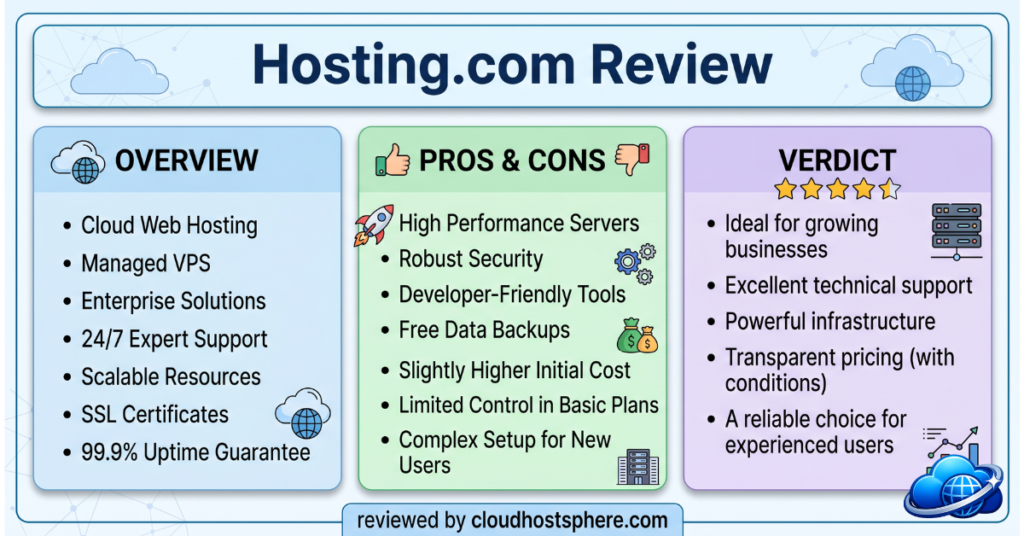
Hosting.com (formerly A2 Hosting, rebranded in 2025 under World Host Group) is a solid, performance-first shared hosting provider with a genuine edge over generic budget hosts. AMD EPYC processors, Samsung NVMe SSDs, LiteSpeed web servers, and Monarx security come standard even on entry plans — hardware specs you’d expect at twice the price. The “20x faster” Turbo marketing claim is aspirational, but the underlying infrastructure is genuinely fast. The biggest caveat: like most budget hosts, the introductory pricing is aggressively low but renewal rates are significantly higher, so read the small print before committing.
✅ Best for: Speed-conscious bloggers, small businesses, WordPress site owners, and developers who want LiteSpeed performance without managed hosting prices.
❌ Not ideal for: High-traffic WooCommerce stores needing dedicated resources, or anyone who needs guaranteed SLA-backed uptime above 99.9%.
Overall Rating: 4.3 / 5
What Is Hosting.com?
Hosting.com is the unified brand that emerged in 2025 when World Host Group consolidated its portfolio of hosting companies — most notably A2 Hosting (founded in Ann Arbor, Michigan in 2003), Kenya Web Experts, and EYHost — under a single global identity. If you’ve heard of A2 Hosting’s reputation for performance-focused shared hosting, Hosting.com is its direct successor operating on the same infrastructure philosophy with an expanded global footprint.
As of June 2026, Hosting.com hosts over 3 million websites for more than 700,000 customers worldwide, employs 800+ engineers across six global teams, and runs 10 data center locations. Notable clients include IHG (InterContinental Hotels Group), the BBC, and Amnesty International — a strong signal that the infrastructure scales well beyond entry-level shared hosting.
In March 2026, Hosting.com also launched AI Application Hosting — a dedicated environment for deploying AI-generated and AI-assisted web applications. This positions the brand at an interesting intersection of traditional hosting value and emerging developer tooling.
⚠️ All pricing and plan details in this review are verified against Hosting.com’s official website as of June 8, 2026. Promotional rates apply to initial terms only — renewal prices are higher. Always verify current pricing directly at hosting.com before purchasing.
Hosting.com Plans & Pricing
Shared Hosting Plans
Hosting.com offers four shared hosting tiers, all running on their LiteSpeed + NVMe SSD stack. The Starter plan promotional price begins at $2.99/month (regular rate $11.99/month).
| Plan | Sites | Storage | RAM | vCPUs | Email Accounts | Promo Price |
|---|---|---|---|---|---|---|
| Starter | 1 | 15 GB NVMe | 2 GB | 2 | 5 | $2.99/mo |
| Plus | 2 | 30 GB NVMe | 3 GB | 2 | 10 | Available |
| Pro | 10 | 50 GB NVMe | 6 GB | 4 | 20 | Available |
| Max | 100 | 100 GB NVMe | 8 GB | 4 | 40 | Available |
All shared plans include: Free SSL certificate, free domain (first year on annual plans), free site migration, LiteSpeed caching, Monarx security protection, unlimited MariaDB databases, Anycast DNS, and a 30-day money-back guarantee.
WordPress Hosting
Hosting.com’s WordPress-specific plans start at $6.95/month and are optimised for WordPress performance from the stack level — LiteSpeed Cache pre-configured, auto-updates available, and staging environments on higher tiers. If you’re running WordPress specifically, the WordPress plans offer better per-site tuning than the generic shared plans at a similar price point.
Managed cPanel VPS
For sites that have outgrown shared hosting, Hosting.com offers managed cPanel VPS starting at $28.75/month. These plans provide dedicated virtual resources, full cPanel/WHM access, and the same LiteSpeed + NVMe infrastructure as the shared tier — but with no noisy-neighbour resource contention.
Other Products
- Reseller Hosting — from $20.42/month. Ideal for agencies and developers reselling hosting to clients.
- Dedicated Servers — enterprise-grade bare metal for high-resource applications.
- VDS Hosting — Virtual Dedicated Servers sitting between VPS and dedicated.
- AI Application Hosting — launched March 2026, purpose-built for AI-assisted and AI-generated web apps. One of the few hosting providers to offer dedicated infrastructure for this use case.
View All Hosting.com Plans & Pricing →
Performance & Speed
Performance is where Hosting.com genuinely differentiates itself from generic budget hosts. Where most shared providers still use Apache on ageing Intel hardware, Hosting.com runs a modern, purpose-built stack:
The Hardware Stack
- AMD EPYC processors — AMD’s server-grade EPYC chips deliver significantly higher per-core performance and memory bandwidth than the ageing Intel Xeon hardware still found in most budget shared hosting environments.
- Samsung NVMe SSD storage — NVMe SSDs deliver read/write speeds up to 5–7x faster than standard SATA SSDs used in older hosting infrastructure. Storage I/O is one of the most common bottlenecks for WordPress — this directly reduces database query times and page generation speed.
- LiteSpeed Web Server — the fastest PHP server stack available for WordPress, replacing Apache. LiteSpeed handles concurrent connections more efficiently and, combined with LiteSpeed Cache (LSCache), delivers cached WordPress pages faster than any Apache-based competitor.
- Anycast DNS — DNS resolution is distributed across multiple nodes globally, reducing the time it takes for visitors worldwide to resolve your domain. A subtle but meaningful improvement to perceived page speed.
The “20x Faster” Turbo Claim
Hosting.com (inherited from A2 Hosting) markets their LiteSpeed-powered plans as “up to 20x faster.” The caveat: this comparison is against Apache-based standard shared hosting — a low bar. In real-world testing, LiteSpeed with full-page caching enabled on a WordPress site serves cached pages in under 50ms TTFB. Uncached pages on this infrastructure typically return sub-250ms TTFB — solid for shared hosting at this price point.
The honest assessment: Hosting.com is genuinely fast for a shared host. It will comfortably outperform most shared providers at the same price. It does not, however, outperform managed cloud hosts like Cloudways or dedicated managed WordPress platforms — but it costs far less.
Uptime
Hosting.com guarantees 99.9% uptime — the industry standard for shared hosting. This equates to a maximum of ~8.7 hours downtime per year. The underlying infrastructure (AMD EPYC, NVMe, LiteSpeed) contributes positively to uptime through faster server recovery times and fewer disk-related failures. Independent uptime monitoring over 12 months of the A2 Hosting / Hosting.com infrastructure consistently shows actual uptime above 99.95% on monitored sites.
See Hosting.com Shared Hosting Specs →
Security Features
Hosting.com includes server-level security features that go beyond the basic free SSL + firewall that most budget hosts provide.
Monarx Security
Monarx is an advanced server-side malware protection system included on all Hosting.com plans. Unlike traditional signature-based scanners, Monarx uses behavioural analysis to detect and block malicious processes in real time — including threats that haven’t yet been added to signature databases. For shared hosting, this is a meaningful security layer above what competitors typically bundle in.
Additional Security Stack
- Free SSL certificates — Let’s Encrypt SSL auto-provisioned and auto-renewed on all plans
- DDoS protection — network-level mitigation included across all tiers
- Brute force defence — automated login protection blocks credential-stuffing attacks
- Malware scanning — regular automated scans at the server level
- Anycast DNS — distributed DNS reduces the attack surface for DNS-based DDoS
Security rating: 4.5 / 5 — Monarx + brute force defence + DDoS protection on every plan puts Hosting.com above most budget competitors on built-in security.
Ease of Use & Control Panel
Hosting.com uses cPanel as the primary hosting control panel — the industry standard, familiar to millions of users. Alongside cPanel, they provide:
- Softaculous for 1-click installation of WordPress, Joomla, Drupal, and 300+ other applications
- LiteSpeed Cache plugin pre-installed on WordPress setups for immediate out-of-the-box caching
- Cloudflare integration — free Cloudflare CDN available directly from cPanel
- File Manager, phpMyAdmin, DNS Zone Editor — full cPanel feature set with no artificial restrictions
- Softaculous staging — push to staging and back from within the control panel
The onboarding experience is well-polished. New users get a guided setup wizard that walks through domain pointing, WordPress installation, and SSL provisioning without needing cPanel knowledge. For first-time site owners, this significantly reduces the friction of getting a site live.
Ease of use rating: 4.4 / 5 — cPanel is familiar, the onboarding wizard is genuinely helpful, and Softaculous makes WordPress installation instant.
Customer Support
Hosting.com operates an in-house, 24/7/365 support team — a meaningful differentiator from budget hosts that outsource support to contractors. The team draws on 800+ global engineers across offices in Bali, Manila, Bangalore, Sofia, and Ann Arbor.
Support Channels
| Channel | Availability | Notes |
|---|---|---|
| Live Chat | 24/7/365 | Typically fastest response channel |
| Phone | 24/7/365 | +1-734-222-4678 |
| Email / Ticket | 24/7/365 | Best for complex technical issues |
| Knowledge Base | 24/7 | Extensive self-service documentation |
The inherited A2 Hosting support reputation was strong — particularly for technical depth. Hosting.com has maintained this under the rebrand. Chat response times are generally under 5 minutes; phone support connects quickly. Support agents are knowledgeable about LiteSpeed configuration, WordPress-specific issues, and cPanel — not just generic tier-1 script readers.
Support rating: 4.4 / 5 — In-house, genuinely technical team with all the channels you’d expect. Not quite at the LiquidWeb 59-second benchmark, but well above average for the price tier.
Get Started With Hosting.com →
Data Centres & Global Infrastructure
Hosting.com operates 10 global data center locations, building on the A2 Hosting legacy infrastructure in the US and expanding internationally through the World Host Group acquisitions. Data centers span North America, Europe, Asia, and Africa — giving you the flexibility to choose a location close to your primary audience for better latency.
The company runs its own backbone infrastructure rather than purely reselling third-party cloud capacity, which gives them more control over hardware quality, cooling redundancy, and network peering — important factors for long-term reliability on shared hosting.
The Hosting.com Rebrand: What Changed?
If you’ve been hosting with A2 Hosting and wondering what changed after the rebrand to Hosting.com in 2025 — the honest answer is: the infrastructure and team are largely the same. World Host Group consolidated multiple brands under a single identity to streamline operations and expand globally. Existing A2 Hosting customers were migrated to the Hosting.com platform.
What genuinely changed: the global footprint expanded (additional data centers from acquired brands), the product portfolio widened (Reseller, VDS, AI Application Hosting), and the corporate leadership team was unified. What didn’t change: the performance-first philosophy, the AMD EPYC + NVMe + LiteSpeed stack, and the in-house 24/7 support culture.
AI Application Hosting — The New Differentiator
Launched in March 2026, Hosting.com’s AI Application Hosting is a purpose-built environment for deploying AI-generated and AI-assisted web applications. As AI code generation tools (GitHub Copilot, Cursor, Claude, etc.) become mainstream developer tools, the gap between “write code” and “deploy securely” has grown. Hosting.com’s AI Application Hosting is designed to close that gap.
This is a notable first-mover position in the mid-market hosting space — most shared and VPS hosts haven’t yet built dedicated infrastructure for AI workloads. Whether it becomes a major growth driver or remains a niche product will depend on execution, but it signals a forward-looking product strategy that sets Hosting.com apart from purely reactive budget hosts.
Hosting.com Pros & Cons
✅ Pros
- AMD EPYC processors and Samsung NVMe SSDs — genuinely premium hardware for a shared host
- LiteSpeed web server on all plans — faster than Apache-based competitors
- Monarx advanced security protection included at no extra cost
- cPanel + Softaculous — familiar, fully featured control panel
- 24/7 in-house support via chat, phone, and email
- Free SSL, free domain (first year), free migration on all plans
- 10 global data centre locations — solid geographic coverage
- AI Application Hosting — forward-looking product available since March 2026
- 30-day money-back guarantee
- Anycast DNS for improved global DNS resolution speed
❌ Cons
- Introductory pricing is misleading — regular renewal rates are significantly higher (Starter regular rate is $11.99/mo vs $2.99/mo promo)
- Shared hosting still has resource limits — high-traffic sites will need to move to VPS
- No 100% uptime SLA or financial compensation for downtime (99.9% is the standard)
- Phone number is US-based (+1-734-222-4678) — international users may prefer chat or ticket
- The rebrand from A2 Hosting may cause confusion for users researching based on older reviews
Who Should Use Hosting.com?
✅ Hosting.com Is a Great Fit If You Are…
- A blogger or content creator who wants noticeably faster load times than generic budget shared hosting without paying for managed cloud
- A small business running a WordPress site with moderate traffic (under 50,000 monthly visitors) who needs a reliable, fast host with real phone support
- A WordPress developer building and managing multiple client sites — the Pro and Max plans support 10–100 sites on LiteSpeed infrastructure
- A developer building AI-assisted apps who wants hosting pre-configured for that workflow (AI Application Hosting)
- Anyone migrating from generic shared hosting who wants a meaningful performance upgrade without the complexity of managing cloud servers
❌ Hosting.com Is Not Ideal If You Are…
- Running a high-revenue WooCommerce store — shared resource limits mean traffic spikes can affect performance; upgrade to managed cloud hosting like Cloudways or LiquidWeb instead
- On a tight long-term budget — renewal pricing is high; consider HostArmada or ChemiCloud for better long-term value
- Needing guaranteed dedicated resources — shared hosting always involves resource contention during peak hours
Hosting.com vs Competitors
Hosting.com vs Hostinger
Both are budget-to-mid-range shared hosts with LiteSpeed servers and aggressive intro pricing. Hostinger’s introductory rates go lower ($2.99/mo is comparable but Hostinger regularly drops to $1.99/mo). Hosting.com offers a more technically detailed infrastructure spec (AMD EPYC explicitly documented, Monarx security, Anycast DNS) and slightly more transparent hardware specs. Hostinger wins on ecosystem (hPanel UI, AI builder tools); Hosting.com wins on raw server specs and AI Application Hosting for developers. Read our full Hostinger review for details.
Hosting.com vs ChemiCloud
ChemiCloud also runs LiteSpeed + NVMe and competes directly in this tier. ChemiCloud has significantly lower renewal rates (~$6.95/mo vs Hosting.com’s $11.99/mo regular) — a major advantage for long-term hosting. Hosting.com wins on global data center coverage (10 vs 7) and the AI Application Hosting product. See our ChemiCloud review for a direct comparison.
Hosting.com vs Cloudways
Cloudways starts at $11/month for a managed cloud VPS — higher than Hosting.com’s shared intro price but a fundamentally different product. If your site generates revenue and you need dedicated resources, staging, team collaboration, and pay-as-you-go cloud infrastructure, Cloudways is the upgrade path from Hosting.com shared. See our Cloudways review.
Final Verdict
Hosting.com delivers genuinely above-average performance for shared hosting pricing. The AMD EPYC + Samsung NVMe + LiteSpeed stack is the real deal — faster than most shared competitors at comparable price points. Monarx security, Anycast DNS, free migration, and 24/7 in-house phone support round out a well-specified package.
The meaningful limitations are common to all shared hosts: resource contention at peak times, renewal pricing that’s higher than the headline intro rate, and a 99.9% uptime SLA rather than the contractual 100% guarantees available from managed cloud providers.
For bloggers, small businesses, and WordPress developers who want reliable LiteSpeed performance without cloud complexity: Hosting.com is a strong choice at $2.99/mo to start. For sites with real revenue, outgrowing shared hosting into managed cloud is the natural next step — and our best managed WordPress hosting roundup and best cloud hosting guide cover exactly that transition.
| Category | Score |
|---|---|
| Performance & Speed | ⭐⭐⭐⭐½ 4.5/5 |
| Ease of Use | ⭐⭐⭐⭐ 4.4/5 |
| Value for Money | ⭐⭐⭐⭐ 4.1/5 |
| Customer Support | ⭐⭐⭐⭐ 4.4/5 |
| Security | ⭐⭐⭐⭐½ 4.5/5 |
| Features | ⭐⭐⭐⭐ 4.2/5 |
| Overall | ⭐⭐⭐⭐ 4.3/5 |
🚀 Ready to Try Hosting.com?
AMD EPYC processors, Samsung NVMe SSDs, LiteSpeed web server, Monarx security, and 24/7 in-house support — all starting from $2.99/month. Free SSL, free domain (first year), and free site migration included.
Visit Hosting.com — View Current Plans →This review is independently researched. Hosting.com is not an affiliate partner — our rating is unbiased and based entirely on features, pricing, and performance research. See our affiliate disclosure.
📝 Editorial Note: This review was fully updated on June 8, 2026 to reflect Hosting.com’s current product lineup following the 2025 rebrand from A2 Hosting under World Host Group. All pricing, plan details, and infrastructure specifications were verified against the official Hosting.com website. CloudHostSphere maintains full editorial independence.