⚡ Quick Verdict
Managed WordPress hosting means your hosting provider handles all the technical maintenance of your WordPress site — automatic updates, daily backups, security monitoring, server performance, and expert WordPress support. You focus on your content and business; they keep the server running.
✅ Best for: Business owners, bloggers, WooCommerce stores, and anyone who wants their WordPress site to run reliably without becoming a sysadmin.
❌ Skip it if: You’re a developer who enjoys managing your own server stack and wants maximum control over every layer of the infrastructure.
Top pick for most users: Cloudways — managed cloud WordPress from $11/month →
If you’ve ever asked yourself “what does managed WordPress hosting actually mean — and do I really need it?” you’re in exactly the right place. This guide cuts through the jargon and gives you a plain-English answer, so you can make the right call for your site.
What Is Managed WordPress Hosting?
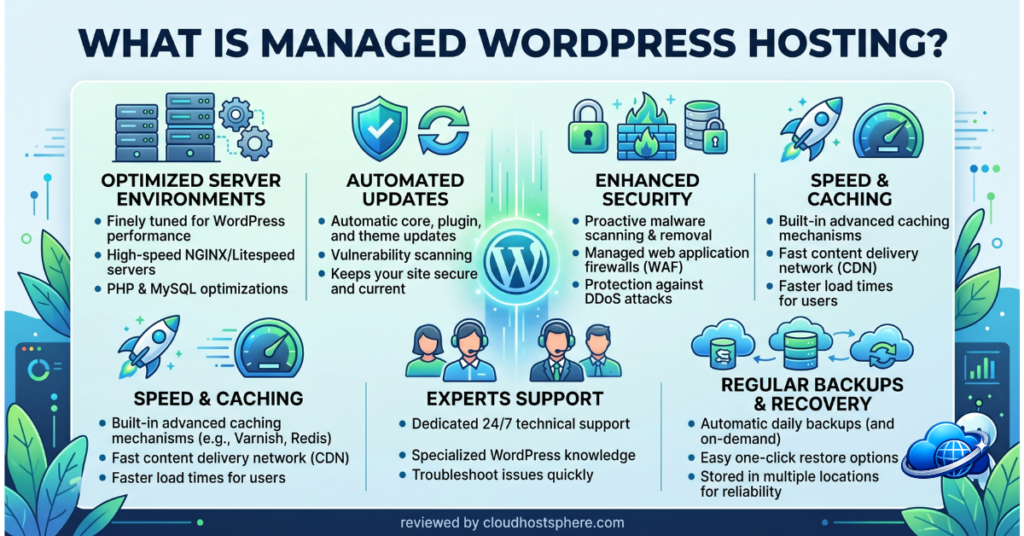
Managed WordPress hosting is a type of web hosting where the provider takes care of the technical maintenance of your WordPress site — so you don’t have to. Instead of managing core updates, security patches, backups, and server performance yourself, the host handles it all in the background.
Think of it this way: standard web hosting is like renting a bare apartment — you get the space, but you’re responsible for everything inside it. Managed WordPress hosting is more like a serviced apartment — the cleaning, maintenance, and utilities are handled for you.
What Does “Managed” Actually Include?
The exact features vary by provider, but a good managed WordPress host typically covers all of the following:
- Automatic WordPress core updates — your WordPress version stays current without any action from you
- Automatic plugin and theme updates — often with rollback protection if an update breaks something
- Daily (or real-time) backups — with one-click restore points so you can roll back instantly
- Server-level security scanning — malware detection, firewall rules, and proactive threat monitoring
- Staging environments — a safe copy of your site to test changes before pushing them live
- Performance optimisation — custom caching layers, CDN integration, and server stacks tuned for WordPress
- WordPress-specific support — agents who understand WordPress problems, not just generic server issues
Managed vs Unmanaged WordPress Hosting
| Feature | Managed WordPress | Unmanaged / Standard Hosting |
|---|---|---|
| WordPress updates | Automatic | Manual |
| Security patching | Provider handles it | You handle it |
| Daily backups | Included, automatic | Manual or paid add-on |
| Staging environment | Usually included | Rarely included |
| Performance tuning | Pre-optimised for WP | Generic server stack |
| Support expertise | WordPress specialists | General server support |
| Price | Higher | Lower |
| Best for | Businesses, bloggers, stores | Developers, DIY users |
Who Needs Managed WordPress Hosting?
Managed WordPress hosting is the right choice if any of the following apply:
- You’re not a developer — you want your site to “just work” without knowing what PHP version you’re running
- Your site generates revenue — a WooCommerce store, a membership site, or a business that can’t afford downtime
- You’ve been hacked before — managed hosts run proactive security at the server level, before threats reach your WordPress installation
- You’re scaling fast — managed hosting handles traffic spikes without manual server configuration
- You manage multiple WordPress sites — centralised management tools save significant time across a portfolio
- You value your time over the cost difference — the monthly premium is often less than one hour of developer time to fix a server problem yourself
Try Cloudways — Best Value Managed WordPress →
Is Managed WordPress Hosting Worth the Extra Cost?
The honest answer: for most website owners, yes.
The average WordPress site faces thousands of automated attack attempts per day. A single successful brute-force attack or plugin vulnerability can take your site offline, expose customer data, or result in Google blacklisting your domain. Cleaning up a hacked site — or recovering from a bad update that broke your WooCommerce store on a Friday evening — can cost far more than a year of managed hosting.
That said, if you’re a developer who enjoys managing servers, or if you’re running a low-traffic personal blog you can maintain manually, a basic VPS or shared hosting plan may be perfectly fine to start. There is no shame in starting cheap and upgrading when the site starts generating revenue.
Types of Managed WordPress Hosting
Not all managed WordPress hosting is the same. There are three main models:
1. Managed Cloud WordPress Hosting
Your WordPress site runs on cloud infrastructure (AWS, Google Cloud, etc.) with day-to-day management handled by the hosting provider. This gives you the best of both worlds — cloud-level scalability plus hands-off management. Cloudways is the most popular and best-value example of this model, starting at just $11/month.
2. Dedicated Managed WordPress Hosting
Providers like WPX Hosting run entirely proprietary infrastructure built specifically for WordPress. These hosts typically deliver the fastest performance and most WordPress-specific features, but at a higher price point. Best for high-traffic publishers and performance-obsessed teams.
3. Platform-as-a-Service WordPress Hosting
Services like Pressable and WordPress.com (Business plan and above) are fully hosted platforms where WordPress is maintained entirely by the provider. You get the least control but the most convenience — ideal for content-focused site owners who never want to think about servers.
Best Managed WordPress Hosting Providers
Here’s a quick overview of the top providers across different budgets and use cases. For the full breakdown, see our best managed WordPress hosting roundup.
🥇 Cloudways — Best Overall for Flexibility & Value
Choose your cloud infrastructure from AWS, Google Cloud, Vultr, DigitalOcean, or Linode. Pay only for what you use, scale anytime, and manage everything from one clean dashboard. The best value-for-performance managed WordPress option available.
Visit Cloudways — From $11/Month →
🥈 WPX Hosting — Best for Pure WordPress Speed
Custom-built infrastructure designed entirely around WordPress. Includes a free global CDN, daily backups, staging environments, and some of the fastest support response times in the industry — typically under 30 seconds on live chat.
🥉 Pressable — Best for Non-Technical Users
Powered by Automattic (the company behind WordPress.com), Pressable handles everything from updates to security monitoring. Perfect for business owners who want a completely hands-off WordPress experience and don’t want to think about servers at all.
Servebolt — Best for High-Traffic Publishers
Servebolt uses a unique full-page caching architecture that delivers near-static site speeds for dynamic WordPress. Excellent choice for high-traffic publishers, news sites, and performance-obsessed site owners who serve tens of thousands of page views per day.
How to Choose the Right Managed WordPress Host
Use this simple framework to narrow down your choice:
- Set your budget first — managed WordPress hosting ranges from ~$11/month (Cloudways) to $50+/month for enterprise plans. Know your number before comparing features.
- Assess your technical comfort level — Cloudways gives you more control; Pressable gives you almost none (which is fine for most people).
- Match the plan to your traffic — a low-traffic blog needs far fewer resources than a WooCommerce store with 50,000 monthly visitors.
- Check the backup policy carefully — daily backups are the minimum; real-time backups are worth the premium if your content or orders change constantly.
- Read support reviews independently — fast, WordPress-knowledgeable support is the single biggest differentiator between hosts at similar price points.
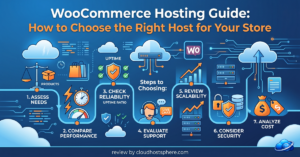
For a detailed side-by-side of the top options, see our how to choose WordPress hosting guide and our full best managed WordPress hosting roundup.
Frequently Asked Questions
Is managed WordPress hosting faster than regular hosting?
Yes, in almost every case. Managed WordPress hosts use server stacks specifically optimised for WordPress — custom caching layers, PHP-FPM configuration, Redis object caching, and CDN integration that standard shared hosting doesn’t offer by default.
Can I use any WordPress plugin on managed hosting?
Most managed hosts support the full WordPress plugin ecosystem. Some highly managed platforms (like WordPress.com Business) restrict certain plugins for security. Cloudways, WPX, Pressable, and Servebolt all support any plugin you want to install.
What’s the difference between managed WordPress hosting and managed VPS?
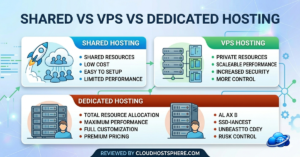
Managed WordPress hosting is pre-configured specifically for WordPress sites. Managed VPS gives you a managed virtual server you can use for anything — WordPress, custom apps, or multiple sites with different software stacks. See our shared vs VPS vs dedicated hosting guide for more detail.
Is managed WordPress hosting worth it for a small blog?
For a brand-new blog with minimal traffic, standard shared hosting is perfectly fine to start. As soon as your site begins generating income or attracting consistent traffic — even a few thousand visits per month — switching to managed hosting is worth the upgrade for peace of mind alone.
Do I still need a security plugin with managed WordPress hosting?
Server-level security (malware scanning, WAF, DDoS protection) is handled by your managed host. You may still want a plugin like Wordfence for application-level login protection and file integrity monitoring — but the reliance on security plugins is significantly reduced compared to unmanaged hosting.
🚀 Ready to Try Managed WordPress Hosting?
Cloudways is our top pick for most users — managed cloud WordPress starting at $11/month, choose your own cloud provider, pay as you go, no annual lock-in.
Start With Cloudways Today →
Try WPX Hosting →
Try Pressable →
Try Servebolt →
These are affiliate links — if you sign up through them, we may earn a commission at no extra cost to you. Read our full affiliate disclosure.